
Punish your settlers with the pillory settlement structure included in the Contraptions Workshop DLC for Fallout 4. This medieval torture device was a common sight in town-squares across the nation during the Revolutionary period that so much of Fallout 4 is fixated on, and now you can enjoy the simple pleasures of assigning settlers to an uncomfortable day in the sun for their (mild) transgressions.
If there’s a deeper purpose behind the pillory, we don’t exactly know what that is yet. But we do know that you’ll earn a trophy / achievement for building and assigning a jerk a stay in the slammer. Think of the pillory as a post-apocalyptic one-man jail, because assigning a settler earns you the “Time Out” trophy / achievement. Learn how to construct a pillory and how to assign settlers to the device with the walkthrough below.
Explore Gameranx’s massive list of guides, how-to’s, secret locations, and everything else a fresh Vault 111 escapee needs to thrive on the Fallout 4 Ultimate Commonwealth Guide and become a true post-apocalyptic survivor.
Uncover everything there is to know about the Contraptions Workshop DLC with all the guides on Gameranx:
- Fallout 4: Contraptions – How to Use Builders & Make 100 Items
- Fallout 4: Contraptions – How to Display Armor & Weapons
- Fallout 4: Contraptions – All Trophies & Achievements Guide
- Fallout 4: Contraptions – Weather Change Shells – Fireworks Guide
- Fallout 4: Contraptions – Item IDs List | Dev Console Commands
- Fallout 4: Contraptions – How to Get New Power Armor Paint Jobs
- Fallout 4: Contraptions – 10 DLC Facts You Need To Know
How to Assign Settlers to a Pillory
The Pillory is for those annoying settlers that deserve punishment. If you’re feeling especially cruel and unusual, you can lock one of your settlers in a pillory. It’ll earn you the ‘Time Out’ trophy / achievement, and give you some quick laughs.
First off, you’ll need to find the Pillory. [This item is exclusive to the Contraptions DLC.]
- Open the Workshop Menu and open Resources -> Miscellaneous
- The Pillory is the last choice in the selection menu.
- The Pillor requires (4) Wood, (1) Concrete, and Local Leader Perk (Req: Lvl 14, CHR 6)
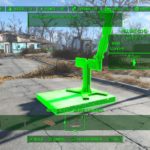

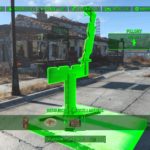

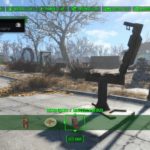
Place the pillory down, preferably somewhere in the center of your settlement. Now it’s time to find an unlucky contestant.
- Enter workshop mode, then select a settler. Once selected, you’ll be able to reassign that settler to any task you select next.
- That settler’s new assignment? Living in the pillory. With a settler still selecting, ‘use’ the pillory to assign your NPC to the stocks. They’ll walk over and climb on in. The settler will stay in the stocks until you assign them to something new.
The achievement / trophy will pop right after you assign the poor soul. They don’t even need to -actually- enter he pillory. You can reassign them to a different job if you’re feeling generous.
For our pillory, we selected MacCready. He used to be a mercenary, so he must have plenty to atone for, right?
Need more Fallout 4 DLC guides? Check out these Far Harbor secrets, locations, and walkthroughs:
- Fallout 4: Far Harbor – All New Weapons | Locations Guide
- Fallout 4: Far Harbor – All New Armor & Apparel | Locations Guide
- Fallout 4: Far Harbor – Islander’s Almanac Magazine Locations
- Fallout 4: Far Harbor – 3 Workshop Locations | Push Back the Fog Guide
- Fallout 4: Far Harbor – New Recipes | Just Add Saltwater Guide
- Fallout 4: Far Harbor – Breathe Underwater | Dive Suit Location
- Fallout 4: Far Harbor – Bowling Ball Launcher Location Guide
- Fallout 4: Far Harbor – How to Get 3 New Settlement Guard Dogs
- Fallout 4: Far Harbor – Easy Vim! Unique Power Armor Location
- Fallout 4: Far Harbor – DLC Unique Perks | How to Unlock
- Fallout 4: Far Harbor – Best Gear Guide | Assault Marine Locations
- Fallout 4: Far Harbor – All 5 DiMA Memory Puzzle Solutions
- Fallout 4: Far Harbor – Item Console Codes | Weapons & Armor Cheats
- Fallout 4: Far Harbor – Discover the Secrets of Cranberry Island
- Fallout 4: Far Harbor – Tourism Guide | 10 Essential Locations