Rematch brings a fresh perspective to soccer with an immersive third-person view over the one character on the team that you control. A major mechanic in Rematch you’ll have to get used to pretty quickly is the camera and this guide contains the best camera settings for beginners and advanced players.
This arcade-style game does its best to make players feel like a real-life soccer player. Winning requires accuracy, quick reaction times, and being a team player. Having the correct camera settings will help you do just that.
Lights, camera, action!
The camera settings that favor a slower playstyle and that we recommend for beginners in Rematch are:
- Mouse sensitivity: 1.5
- Mouse sensitivity vertical scale: 1
- Camera speed for controller: 1.7
- Camera speed boost for controller: 1
- Camera aim speed for controller: 1
- Camera aim speed boost for controller: 1
- Camera FOV: 90
- Camera shake: 0
- Minimap mode: Rotating
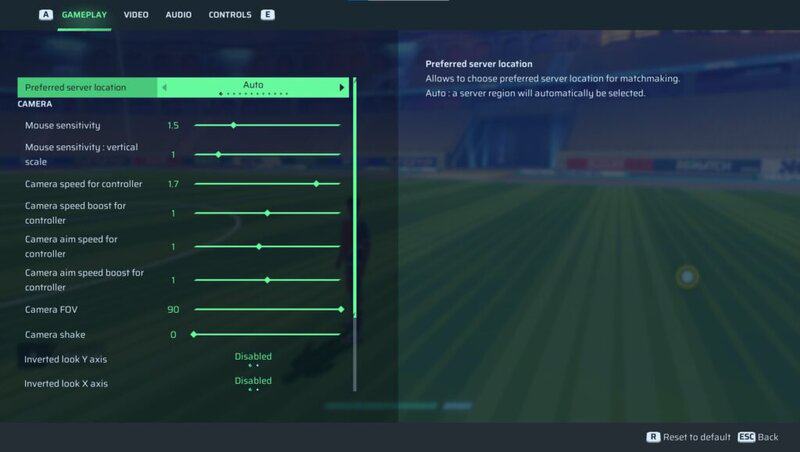
Camera Speed For Controller means how fast your camera pans as you run around the field. Using 1.7 offers more control and fluidity, but it can be adjusted based on your personal preferences. The lower you go with your sensitivity settings, the easier it is to line up your shots, but it will make looking around the field that bit more difficult.
However, having the FOV at 90 lets you see more of the pitch on your screen at once, and arguably the most important setting, the rotating mini map, allows you to see where everyone is positioned without having to constantly move your camera. Resultingly, constant use of the mini map gives the go-ahead to keep your eyes on the ball and is integral in formulating a plan of how you’re going to score a goal.
Here are the settings we recommend for more advanced Rematch players:
- Mouse sensitivity: 1.5
- Mouse sensitivity vertical scale: 1
- Camera speed for controller: 1.7
- Camera speed boost for controller: 1.7
- Camera aim speed for controller: 1
- Camera aim speed boost for controller: 1.7
- Camera FOV: 90
- Camera shake: 0
- Minimap mode: Rotating
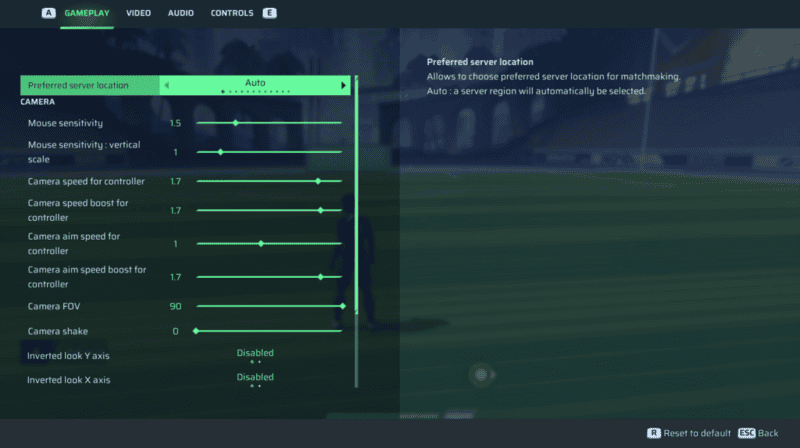
Bumping up the sensitivity settings allows you to keep up with the constant movement of your team and the ball. The movement here is more free across all aspects, whether you’re sprinting or charging up a shot. The importance of the mini map still can’t be overlooked, even on a higher sensitivity.
The reason for keeping the camera aim speed at 1 is to grant you more control as you charge up a shot. Having a slower camera while aiming enables for better accuracy, contrasting the way in which you will be swinging the camera around with the higher sensitivity on all the other fronts.
Again, the sensitivity values are unique to the individual. If you find 1.7 to be too slow, you may find yourself bumping the value up to the maximum sensitivity which is 2. Conversely, if 1.7 is a tad too fast, you may find success with a middle ground of 1.5. With that said 1.7 does just enough to provide a snappy speed, while avoiding being too disorientating.