• Skip to main content
  • Skip to header right navigation
  • Skip to site footer
Gameranx

Gameranx

Video Game News, Lists & Guides

  • News
  • Features
  • Platforms
    • Xbox Series X
    • PS5
    • Nintendo
  • Videos
  • Upcoming Games
  • Guides

Rematch: How to Mute Players

July 29, 2025 by Lauren Sayles

Voice chat isn’t for everyone.

From the creators of Sifu comes a brand new title in the form of Rematch, a third-person soccer game that sways away from tradition by seeing you take control of a singular player in fast-paced, arcade-style matches that are all about working together as a team. It is solely a multiplayer experience, meaning you will have to play with others to secure a victory in 3v3, 4v4, or 5v5 modes. If you can hear players talking through their microphones in Rematch and you want to mute them, you are in the right place.

Rematch does have game chat, allowing you to communicate with, and hear members of your team. Game chat isn’t for everyone, and if you want to play Rematch in peace, you can make sure the lobby is muted.

More Rematch guides

Rematch: How to Customize your Kit and Change Player Number | Rematch: How to Perform a Volley | Rematch: How to do all Skill Moves | Rematch: What is Clutch Time? | Last Action and Last Shot Explained | Rematch: How to Play Offline | Rematch: How to Dribble and Enter Dribble Stance | Rematch: Best Camera Settings | Beginner and Advanced | Rematch: How to Access Freeplay Mode | Rematch: How to Perform a Rainbow Flick |

How to mute players in Rematch

If there’s a particular player you want to mute during a game of Rematch, it’s not actually possible to mute individual users. However, you can disable voice chat by going to your Rematch settings, navigating to the audio tab, and toggling the voice chat option to “disabled.” This will mute your microphone and you shouldn’t be able to hear other players.
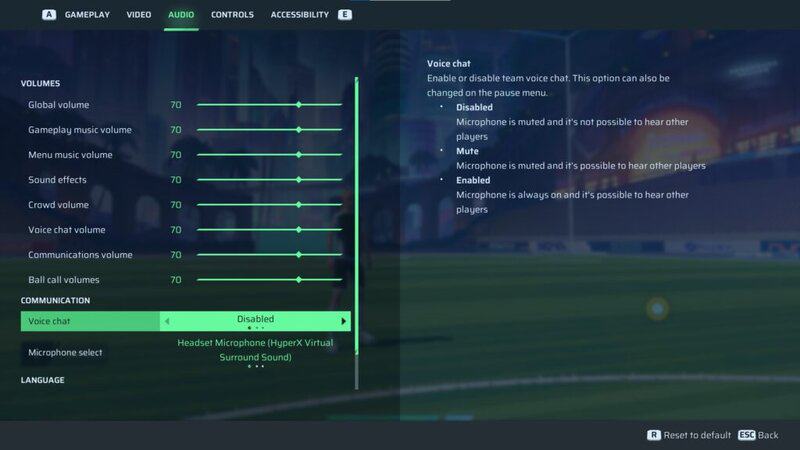
With that said, I personally have voice chat disabled and I’ve still been able to hear teammates. If you experience the same issue, try turning voice chat volume down to 0. Again, go to the audio tab of your Rematch settings and turn voice chat volume down from the default 70 to 0. That way, you may still be able to see microphones moving, but you won’t be able to hear what other players are saying.

Of course, you can enable voice chat again if you’re playing with friends or simply change your mind. Go back to the audio section of the settings menu and enable voice chat, or turn the volume back up to your desired level. Whether you are already in a match or loading into your next one, you should then be able to hear anyone in your game that may be speaking.

Related Guides

Rematch how to change player number
Rematch: How to Customize your Kit and Change Player Number
rematch how to volley
Rematch: How to Perform a Volley
all skill moves in rematch
Rematch: How to do all Skill Moves
Rematch: What is Clutch Time Last Action and Last Shot
Rematch: What is Clutch Time? | Last Action and Last Shot Explained
how to standing tackle and slide tackle in rematch
Rematch: How to Tackle | Standing Tackle and Slide Tackle
how to play rematch offline
Rematch: How to Play Offline
how to dribble and dribble stance in Rematch
Rematch: How to Dribble and Enter Dribble Stance
Rematch how to rainbow flick
Rematch: How to Perform a Rainbow Flick
how to play freeplay mode in rematch
Rematch: How to Access Freeplay Mode
best camera settings rematch
Rematch: Best Camera Settings | Beginner and Advanced

Share this post:

FacebookTwitterLinkedInPinterest

Recent Videos

10 Games That CHANGE If You Play Them WRONG

10 Games That CHANGE If You Play Them WRONG

20 Best FREE Games We've EVER PLAYED

20 Best FREE Games We've EVER PLAYED

10 Recent Games That SPOILED US

10 Recent Games That SPOILED US

UBISOFT LOSES 1.3 BILLION, GTA 6 CEO RESPONDS & MORE

UBISOFT LOSES 1.3 BILLION, GTA 6 CEO RESPONDS & MORE

15 Games With The Most REALISTIC NPCs

15 Games With The Most REALISTIC NPCs

Top 10 NEW Games of June 2026

Top 10 NEW Games of June 2026

LEGO Batman: Legacy of The Dark Knight - Before You Buy

LEGO Batman: Legacy of The Dark Knight - Before You Buy

Assassin's Creed Black Flag DESPERATELY Wants You Back

Assassin's Creed Black Flag DESPERATELY Wants You Back

7/10 Games We PLAY MORE THAN 10s

7/10 Games We PLAY MORE THAN 10s

Category: FeaturesTag: Guides, Kepler Interactive, PC, PS5, Rematch, Rematch guides gameranx, Sloclap, Xbox Series X/S

Sidebar

Recent Posts

  • The Next Kingdom Come Deliverance Could Come Out By 2028 “If Everything Goes Right”
  • No More Cheaters: Marvel Rivals Bans A Record 485 Accounts & Three Devices
  • Korean Game Rating May Have Leaked LEGO Skylines
  • Rumor: Elsewhere Entertainment’s Open World, Multiplayer RPG Will Have PvE (To Rival GTA?)
  • 007 First Light Will Only Have Preloads For PS5 – But Other Platforms Still Get Early Access Privileges

Copyright © 2026 · Gameranx · All Rights Reserved · Powered by Mai Theme