
A highly important yet understated aspect of a fighting game is The Announcer. The voice that says every character and stage when they are selected adds that extra bit of style that can really make a game stand out in your memory. Mortal Kombat 1 has a strong default Announcer with a booming sound that prepares you for the violent encounter that is about to unfold. That being said, the game does give you the ability to change the voice of The Announcer to members of the cast, though you will need to unlock them first. Some of you might even have some of these alternate voices unlocked but don’t know how to apply them while others will want to know how to get every announcer in the game. So, allow me to explain both. This guide will tell players how to change the voice of The Announcer and how to unlock new voices in Mortal Kombat 1.
Stay up to date on all of Gameranx’s guides by checking out our Guide Index for Mortal Kombat 1.
More Mortal Kombat 1 Guides:
Mortal Kombat 1: Full Achievement and Trophy List | Mortal Kombat 1: Full Roster List | Mortal Kombat 1: How To Do a Combo Breaker | Mortal Kombat 1: How To Use a Fatal Blow | Mortal Kombat 1: How to Taunt | Mortal Kombat 1: How to Unlock Havik | Mortal Kombat 1: Reversal Moves Explained | Mortal Kombat 1: How to Unlock Kameo Fighters | How Long is the Mortal Kombat 1 Story Mode? | Mortal Kombat 1: Kameo System Explained | Mortal Kombat 1: Character Customization Explained | Mortal Kombat 1: How to Unlock New Cosmetics
How To Change The Announcer In Mortal Kombat 1
You can change the Announcer by going to the Settings section on the Mortal Kombat 1 main menu. Once in Settings, go to the “Video & Audio” tab, which is the fourth option from the top. In this part of the Settings, you will see the option labeled “Announcer Voice” in Audio. Simply switch the name in the option to change the voice of the Announcer. Each character has unique dialogue for specific characters with Johnny Cage having multiple names for each of the playable Characters as well as all of the Kameo Fighters.
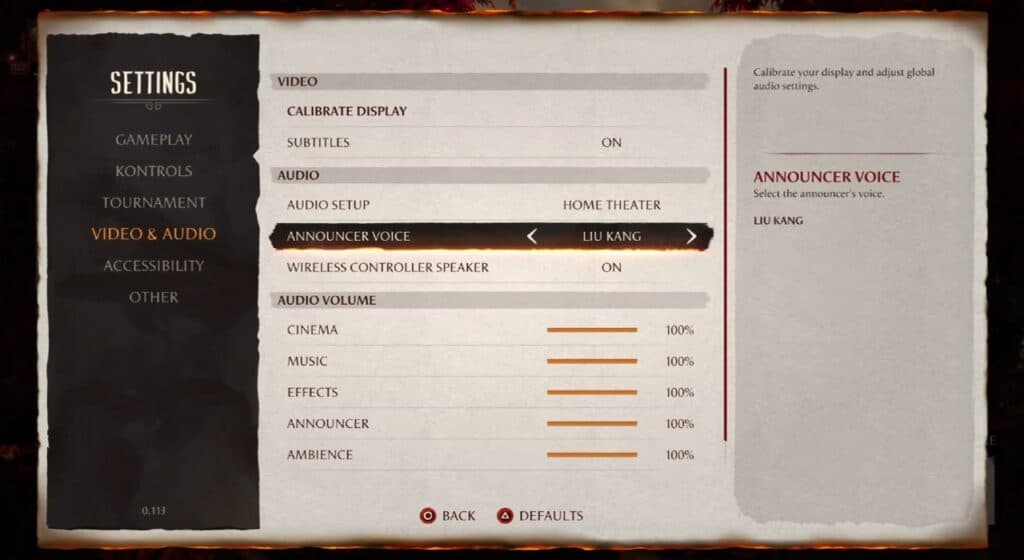
Of course, you will need to unlock these other voice options for The Announcer, all of whom will be unlocked by completing a specific task. As of now, there are a total of 3 additional Announcers that you can equip other than the default voice. The three voices are Johnny Cage, Liu Kang, and Geras. Below is a breakdown of how to unlock all of the voices for The Announcer in Mortal Kombat 1:
- Liu Kang: Complete Chapter 7 of the Story Mode.
- Johnny Cage: Complete the Invasion Mode Tutorial
- Geras: Reach Player Level 50.
Stay tuned to Gameranx for future news, updates, and guides for Mortal Kombat 1.








