
• Skip to main content
  • Skip to header right navigation
  • Skip to site footer
Gameranx

Gameranx

Video Game News, Lists & Guides

  • News
  • Features
  • Platforms
    • Xbox Series X
    • PS5
    • Nintendo
  • Videos
  • Upcoming Games
  • Guides

Rematch: How to Mute Players

July 29, 2025 by Lauren Sayles

Voice chat isn’t for everyone.

From the creators of Sifu comes a brand new title in the form of Rematch, a third-person soccer game that sways away from tradition by seeing you take control of a singular player in fast-paced, arcade-style matches that are all about working together as a team. It is solely a multiplayer experience, meaning you will have to play with others to secure a victory in 3v3, 4v4, or 5v5 modes. If you can hear players talking through their microphones in Rematch and you want to mute them, you are in the right place.

Rematch does have game chat, allowing you to communicate with, and hear members of your team. Game chat isn’t for everyone, and if you want to play Rematch in peace, you can make sure the lobby is muted.

More Rematch guides

Rematch: How to Customize your Kit and Change Player Number | Rematch: How to Perform a Volley | Rematch: How to do all Skill Moves | Rematch: What is Clutch Time? | Last Action and Last Shot Explained | Rematch: How to Play Offline | Rematch: How to Dribble and Enter Dribble Stance | Rematch: Best Camera Settings | Beginner and Advanced | Rematch: How to Access Freeplay Mode | Rematch: How to Perform a Rainbow Flick |

How to mute players in Rematch

If there’s a particular player you want to mute during a game of Rematch, it’s not actually possible to mute individual users. However, you can disable voice chat by going to your Rematch settings, navigating to the audio tab, and toggling the voice chat option to “disabled.” This will mute your microphone and you shouldn’t be able to hear other players.
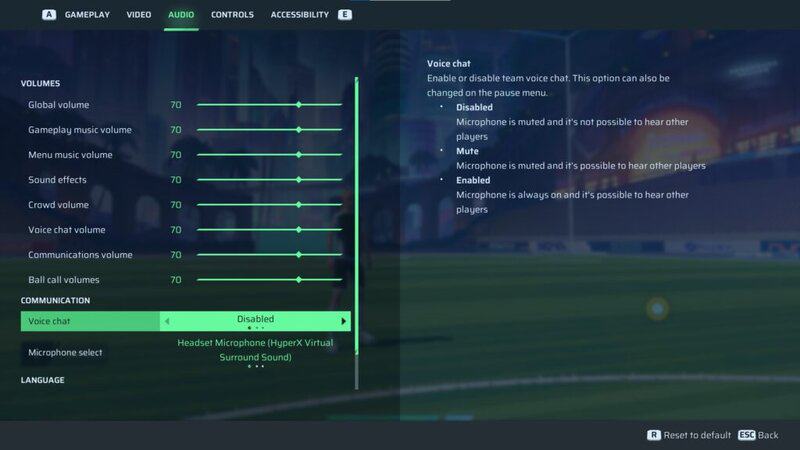
With that said, I personally have voice chat disabled and I’ve still been able to hear teammates. If you experience the same issue, try turning voice chat volume down to 0. Again, go to the audio tab of your Rematch settings and turn voice chat volume down from the default 70 to 0. That way, you may still be able to see microphones moving, but you won’t be able to hear what other players are saying.

Of course, you can enable voice chat again if you’re playing with friends or simply change your mind. Go back to the audio section of the settings menu and enable voice chat, or turn the volume back up to your desired level. Whether you are already in a match or loading into your next one, you should then be able to hear anyone in your game that may be speaking.

Related Guides

Rematch how to change player number
Rematch: How to Customize your Kit and Change Player Number
rematch how to volley
Rematch: How to Perform a Volley
all skill moves in rematch
Rematch: How to do all Skill Moves
Rematch: What is Clutch Time Last Action and Last Shot
Rematch: What is Clutch Time? | Last Action and Last Shot Explained
how to standing tackle and slide tackle in rematch
Rematch: How to Tackle | Standing Tackle and Slide Tackle
how to play rematch offline
Rematch: How to Play Offline
how to dribble and dribble stance in Rematch
Rematch: How to Dribble and Enter Dribble Stance
Rematch how to rainbow flick
Rematch: How to Perform a Rainbow Flick
how to play freeplay mode in rematch
Rematch: How to Access Freeplay Mode
best camera settings rematch
Rematch: Best Camera Settings | Beginner and Advanced

Share this post:

FacebookTwitterLinkedInPinterest

Recent Videos

Metroid Prime 4: Beyond - Before You Buy

Metroid Prime 4: Beyond - Before You Buy

ROUTINE - Before You Buy

ROUTINE - Before You Buy

10 Upcoming FPS Games That LOOK INSANE

10 Upcoming FPS Games That LOOK INSANE

Red Dead Redemption (PS5 Switch 2) - Before You Buy

Red Dead Redemption (PS5 Switch 2) - Before You Buy

This Game Wants To Be SKYRIM 2 Before Elder Scrolls 6

This Game Wants To Be SKYRIM 2 Before Elder Scrolls 6

Marvel Cosmic Invasion - Before You Buy

Marvel Cosmic Invasion - Before You Buy

Top 25 BEST PS5 Games of 2025

Top 25 BEST PS5 Games of 2025

10 WEIRD GAMING Stories of November 2025

10 WEIRD GAMING Stories of November 2025

DESTINY 3 LEAKED, CONSOLE PRICES GOING UP AGAIN? & MORE

DESTINY 3 LEAKED, CONSOLE PRICES GOING UP AGAIN? & MORE

Category: FeaturesTag: Guides, Kepler Interactive, PC, PS5, Rematch, Rematch guides gameranx, Sloclap, Xbox Series X/S

Sidebar

Recent Posts

  • Have We Seen More Of Jason Duval In Grand Theft Auto 6 Than We Think?
  • GTA 6 Fans Discuss The Places In-Game They Want To Explore The Most
  • Epic Games Store Has A Special Mystery Giveaway For You During The Game Awards
  • How Many Gamers Have Truly 100% Completed Borderlands 4?
  • Todd Howard Invited the Obsidian Team To See Fallout Season 2 New Vegas Set

Copyright © 2025 · Gameranx · All Rights Reserved · Powered by Mai Theme