
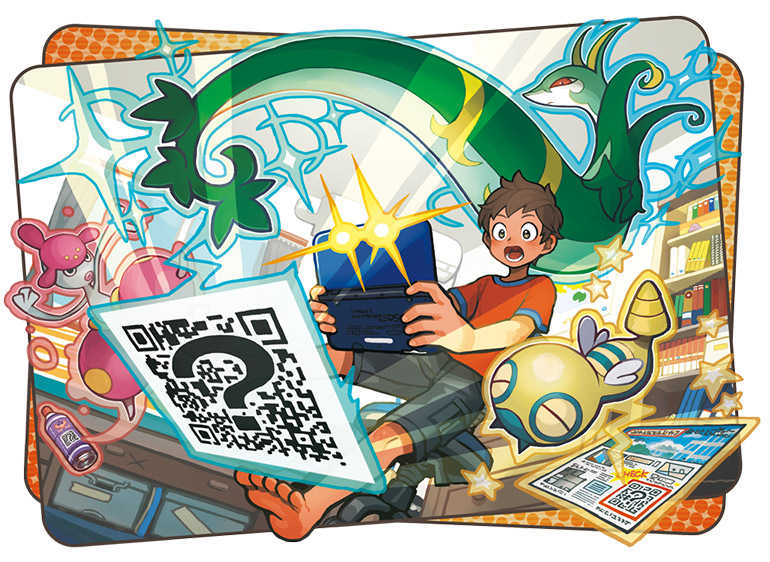
The official patch for Pokemon Sun and Moon is now available in the Nintendo 3DS eShop. Released on 1/11/17, the 1.1 Update fixes a selection of issues for online and offline play — and using the in-game QR Scanner reveals a very special secret that might be exciting for players waiting for Generation 3 Pokemon to start appearing in Pokemon Sun and Moon.
When starting up Pokemon Sun and Moon, you’ll now get a prompt to download the latest patch — it comes in at 296 blocks to download. The patch is required for network features and online play.
- All the Important Pokemon Sun / Moon Changes in Update 1.1
- Fixes a glitch with Z-Moves (Z-Parting Shot, Z-Memento) on Battle Spot.
- Z-Parting Shot and Z-Memento will not be allowed on Battle Spot until Season 2 beginning on 1/17/2017.
- Fixes a glitch when opponent is knocked out by your knocked-out Pokemon wearing a Rocky Helmet.
- Fixes a glitch that causes certain Pokemon (Kadabra, Confusion) to not learn moves after evolving.
- Fixes a glitch with Z-Moves (Z-Parting Shot, Z-Memento) on Battle Spot.
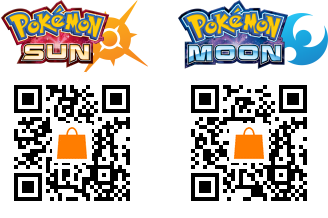
To quickly jump into the eShop download menu for the free update, use the 3DS QR Scanner on the QR Codes below. Whatever version you have, it will automatically scan the proper code when using the built-in code reader.
There’s a little bonus when using these codes too — if scanned in-game, you’ll receive Pokedex entries for Generation 3 Pokemon that don’t appear in the Alola region.
How to Scan QR Codes On 3DS
- Tap L+R (Left Shoulder / Right Shoulder Buttons) at the same time or select the Camera icon to launch the 3DS Camera.
- Tap the QR Code icon (lower left corner) to switch to QR Scanner mode.
- Line up the QR Code with the square to begin scanning.
- The 3DS will ask you if you’d like to “Launch Nintendo eShop”.
What Pokedex Entries Do You Get In-Game?
If you’re new to scanning QR Codes in-game, here’s how it works:
- Load your save file in Pokemon Sun / Moon.
- Open the Rotom Pokedex
- Select QR Scanner — the camera will activate.
- Hold R [Right Shoulder Button] and line up a QR Code in the square.
- If successful, the image will appear in detail and begin scanning.
You’ll then unlock a non-Generation VII Pokemon, available to use immediately. Just stop by a local Pokecenter to pick your new Pokemon up and swap them into you team.
Find even more Pokemon Sun & Moon guides, how-to’s and tutorials on Gameranx:
- 20 Useful Tips & Tricks Pokemon Sun / Moon Doesn’t Tell You
- Pokemon Sun & Moon: 100% Zygarde Guide | Cores & Cells Locations
- Pokemon Sun & Moon: The Best Shiny Pokemon Farming Method
- Pokemon Sun & Moon: How to Efficiently Level Up Poke Pelago
- Pokemon Sun & Moon: Find These NPCs For Free Pokemon | Gifts Guide
- Pokemon Sun & Moon: Easy Way to Raise Happiness | Friendship Guide
- Pokemon Sun & Moon: How To Stop Evolutions | No Everstone Required
- Pokemon Sun & Moon: Everything You Need to Know About Pikachu
- Pokemon Sun & Moon: Get Your Munchlax Mystery Gift & Snorlium-Z Now
- Pokemon Sun & Moon: How to Get Sungaleo / Lunala | Legendaries Guide
- Pokemon Sun & Moon: Where to Find New Moves | All TM Locations
- Pokemon Sun & Moon: Generation 7 Evolution Requirements Guide
- Pokemon Sun & Moon: How to Learn New Pokeball Throw Styles
- Pokemon Sun & Moon: How to Catch Ditto | Rare Pokemon Guide
- Pokemon Sun & Moon: How to Boost Base Stats Fast | EV Farming Guide
- Pokemon Sun & Moon: All Pokemon QR Codes | Complete Gallery
- Pokemon Sun & Moon: How to Evolve | Evolution Stones Locations Guide
- Pokemon Sun & Moon: 6 New Features That Change Everything
- Pokemon Sun & Moon: How to Transfer Pokedex | Compatibility Guide
- Pokemon Sun & Moon: Z-Crystal Locations | Z-Moves Unlock Guide
- Pokemon Sun & Moon: All the Version Exclusive Pokemon | Full List
- Pokemon Sun & Moon: Demo Secrets Guide & Special Events Calendar
- Pokemon Sun & Moon: Preload Available Now | How to Get 12 Free Quick Ballsv






