
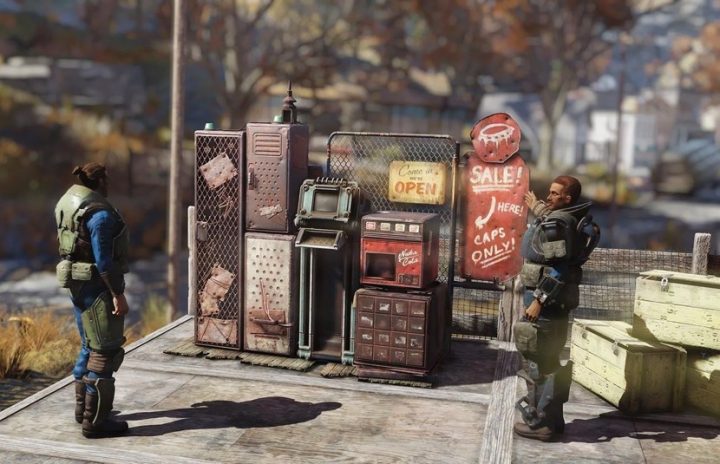
Fallout 76 is the latest installment to the Fallout franchise and it’s gotten some flack as it first launched. Despite some of the criticisms of the game, Bethesda is continuing on and making the most out of the experience for players to enjoy. One aspect that the developers promised would come into the game was an in-game market system where players could sell gear and items to others. This month the update rolled out which added in that component. Known as Vending Machines, this item can be placed within your C.A.M.P and from there allows players to run their own storefront. We’ll give you all the details you need in order to start up your store in the Wasteland.
Find More Fallout 76 Guides Below:
- Fallout 76: How To PVP Without Becoming Wanted | Bonus PVP Modes Guide
- Fallout 76: Power Armor Frames, Core Farming & Unique Set Locations Guide
- Fallout 76: How To Join The Enclave & Get The Laser Minigun | Faction Guide
- Fallout 76: Where To Find The ‘Rose’s Syringer’ Gun | Unique Weapon Guide
- Fallout 76: Where To Find The ‘Perfect Storm’ SMG | Unique Weapon Guide
- Fallout 76: How To Find A Hazmat Suit For Perfect Radiation Protection | Location Guide
- Fallout 76: Save Ammo With These Melee Build Tips | Best Builds Guide
- Fallout 76: Nuke Everything With The CAMP Artillery Schematic | Best Weapons Guide
- Fallout 76: How To Never Run Out Of Healing | Aid Items Tips & Tricks
How To Build Vending Machines
To get your own Vending Machine you need to enter the build menu where you’ll come across a brand new category called Vendors. There is a total of five variants available but none of them require a ton of resources to build. Also, make sure you are getting power to the machine so don’t forget to use a nearby Power Conduit.
Resources Required
- Steel: 3
- Wood: 5
- Power: 3
Variant Vending Machines
The first Vending Machine will be free but there will be additional variants as mentioned which you will have to unlock. All of the variant Vending Machines will require the same resources but it simply offers a different color aesthetic. In order to gain access to these vending machines, you will have to purchase them through the Atomic Shop, but again, you do have the standard red vending machine completely for free.
Atomic Shop Vending Machines
- Blue Paint Vending Machine
- Green Paint Vending Machine
- White Paint Vending Machine
- Yellow Paint Vending Machine
Where To Place Vending Machines
You’ll have to place Vending Machines in your C.A.M.P but its ideal to get to a place near high traffic areas in order. Anyone within the server will be able to see the vending machine through the map.
Selling Items
Now that you have your Vending Machine installed and powered, you can go up and interact with it to put in items for sale. This will bring up a new menu which will showcase all of your inventory from weapons, apparel, ammo, notes, junk, etc. Essentially anything in your inventory is available to be put into the machine in order for another player to purchase.
Note: You will want to make note that you only have 30x slots available to sell items.
Select the item you would like to place in the Vending Machine and from there you will get a new menu pop up which asks you to set the price for the item. This is where you can control how much the item is worth. When you select the item a new icon will appear for it within your inventory to alert you that the item is in a Vending Machine to be sold.
Note: You will receive money from the item, but there will be a 10% tax on each item.
Buying Items
Buying is just as simple. You just need to interact with the Vending Machine, decide what item you would like to purchase and go through the prompts.





