
While going through the main story of Armored Core 6: Fires of Rubicon has plenty of challenges in its main story, some players will want to test their piloting skills against each other. This can be done in the game’s multiplayer mode which can put people in one-on-one or team battles for AC supremacy. This mode is not available at the start of the game, so those who want to enter the battlefield will want to know how to access the mode. This guide will explain to players how to unlock the multiplayer mode in Armored Core 6: Fires of Rubicon.
More Armored Core 6: Fires of Rubicon Guides:
Armored Core 6: Fires of Rubicon – Full Achievement and Trophy List | Armored Core 6: Fires of Rubicon – How to Change Weapons, Colors, and More | AC Customization Explained | Armored Core 6: Fires of Rubicon – OS Tuning Explained | All OS Upgrades and Which To Unlock Early | Armored Core 6: Fires of Rubicon – How to Defeat the HC Helicopter Boss Fight | Armored Core 6: Fires of Rubicon – How to Defeat The Strider Boss Fight | Armored Core 6: Fires of Rubicon – How to Defeat The Juggernaut Boss Fight | Armored Core 6: Fires of Rubicon – How to Defeat The Sulla Boss Fight | Armored Core 6: Fires of Rubicon – How to Defeat The Balteus Boss Fight
How To Play Multiplayer In Armored Core 6: Fires of Rubicon
The multiplayer mode is unlocked after completing the first 2 chapters of Armored Core 6: Fires of Rubicon. This means that you will need to go up past Mission 14: Ocean Crossing before you gain access to the mode. Once you finish Chapter 2, you will have been through enough challenges that you should have an understanding of the game’s mechanics and be able to put up a fight against other real players.
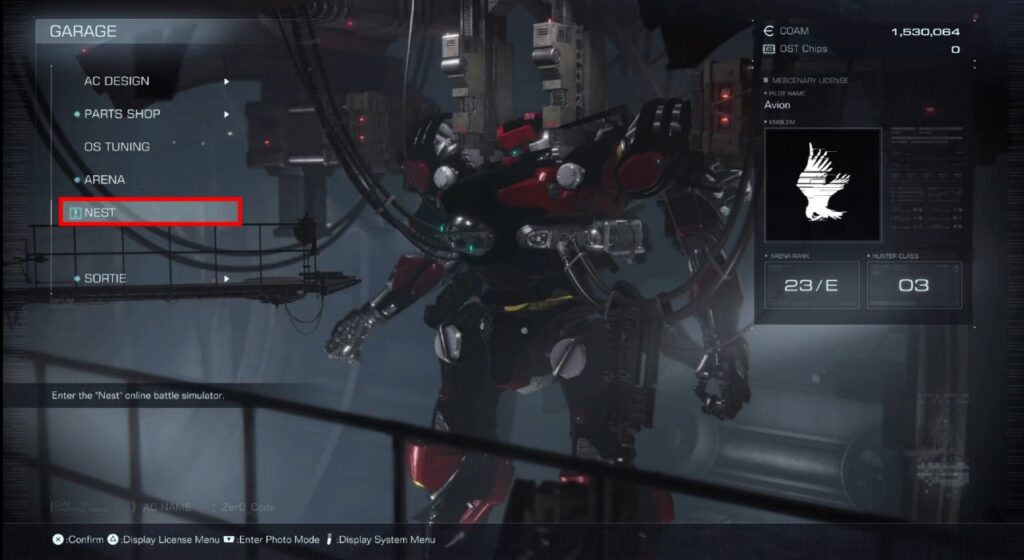
With Mission 14 complete, you will unlock the Garage feature called NEST. This is where you will be able to join 1v1 and 3v3 matches against other players. To join or create a match, go to the Custom Match button and you will be able to either create a room or join a room.
Stay tuned to Gameranx for future news, updates, and guides for Armored Core 6: Fires of Rubicon.


