

Cyberpunk 2077 is a graphical powerhouse, and you’re going to need a powerful computer to run it at full settings. The tricky part is just achieving a stable 60+ framerate, and it is within your grasp by changing a few settings on PC and console. Right now, 60 FPS options are only available for PS5 and Xbox Series X — even though full-fledged versions of Cyberpunk 2077 are not yet available for either. You will get next-gen copies for free if you own one, so there’s no reason not to purchase now.
Things are a little more complicated on PC. Certain settings can tank your performance — and they’re not always obvious. This game has ray tracing, a feature that provides incredible lighting technology but requires serious horsepower, especially if you’re trying to run the game at 4k resolution.
As with any recommendations, find what works best for you. Start by lowering the resolution (2k instead of 4k) and disabling ray tracing. Those are the most obvious power hogs. Now let’s go over the rest of the settings you need to know.
More Cyberpunk 2077 guides:
How Romance Works | All Love Interests & Companions Guide | How To Find Hideo Kojima & BB | Easter Eggs Guide
Recommended Settings On PC & Console
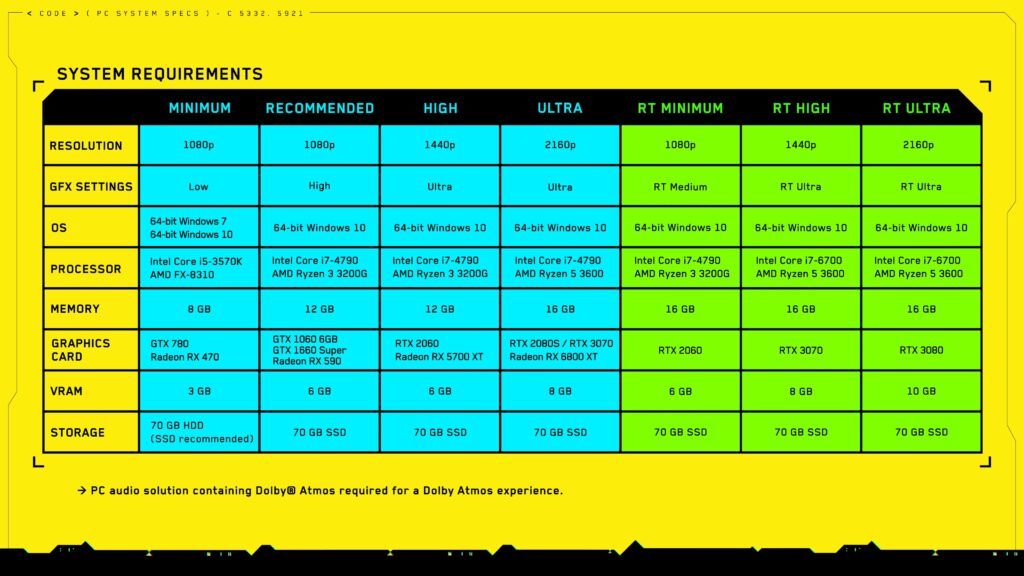
Right-click and open image in new tab for a better look at the recommended settings for your OS, processor, memory and graphics card.
Recommended Settings For PC | How To Improve FPS
Always start by lowering your resolution, changing settings from Ultra to High, or disabling ray tracing first. These will always be the biggest use of system resources. If you want to get higher FPS without your maximum preferred resolution or ray tracing, try these settings.
Enable DLSS: If you want to use ray tracing but don’t want the system hit, try enabling DLSS. This basically cuts your resolution in half but gives you a less system intensive ray tracing. Try it for yourself — results can vary wildly depending on your graphics card.
- DLSS is only available on graphics cards with RTX enabled.
Lower Cascaded Shadows Resolution: One of the biggest hogs of performance. “Cascaded Shadows Resolution” can seriously crunch your FPS, and lowering it from High to Medium is an almost negligible jump in graphics quality. Disabling it can double your FPS.
Change Max FPS: If you’re using an older card and have lowered settings, you might be locked at 30 FPS. Go to the settings and find this one. You might not need to be locked down.
And don’t forget to download the latest Nvidia graphics drivers. One was just released with Cyberpunk 2077 — they really help performance.
Recommended Settings For Console | How To Improve FPS
Improving FPS on consoles is less complicated, but much more restrictive. Currently, 60 FPS is only available on next-gen consoles — even though there currently are no next-gen versions of Cyberpunk available.
- 60 FPS Performance Mode is a special feature available only on Xbox Series X and PS5.
- This mode will appear after installing your Xbox One / PS4 version on your next gen hardware. Download the latest patch and you can activate performance mode in the settings.
Performance Mode lowers the resolution and general graphical fidelity to run at a smooth 60 FPS framerate. In my testing, it looks like it’s set to about medium — the game looks amazing in the mission environments, but you’ll see a larger downgrade in the open-world city while exploring.
That’s our quick rundown of the settings you need to know the most about. Start low and work your way to the settings you want — this is one game you’ll be playing for a long time, so spend a few minutes testing your graphics and performance for the best possible experience.