
Customizing your AC in Armored Core 6: Fires of Rubicon is one of the game’s defining features. Not only does it allow you to change the look and weaponry to express your playstyle, but some encounters and bosses found in FromSoftware’s new mecha title might take putting together the right build to overcome. As you continue to pile on parts and weapons, you might eventually find yourself getting the notification that your AC is “Overburdened.” This prompt will stop you from being able to load into any type of Sortie mission that utilizes your build from main story missions to just the AC Test. Players will want to understand what this notification means, how to get rid of it, and how it factors into other parts of building your AC. This guide provides players with an explanation of being Overburdened in Armored Core 6: Fires of Rubicon.
More Armored Core 6: Fires of Rubicon Guides:
Armored Core 6: Fires of Rubicon – Full Achievement and Trophy List | Armored Core 6: Fires of Rubicon – How to Change Weapons, Colors, and More | AC Customization Explained | Armored Core 6: Fires of Rubicon – OS Tuning Explained | All OS Upgrades and Which To Unlock Early | Armored Core 6: Fires of Rubicon – How to Defeat the HC Helicopter Boss Fight | Armored Core 6: Fires of Rubicon – How to Defeat The Strider Boss Fight | Armored Core 6: Fires of Rubicon – How to Defeat The Juggernaut Boss Fight | Armored Core 6: Fires of Rubicon – How to Defeat The Sulla Boss Fight | Armored Core 6: Fires of Rubicon – How to Defeat The Balteus Boss Fight | Armored Core 6: Fires of Rubicon – How to Defeat The Smart Cleaner Boss Fight | Armored Core 6: Fires of Rubicon – How to Defeat The Sea Spider Boss Fight | Armored Core 6: Fires of Rubicon – How to Play Multiplayer
Overburden Explained In Armored Core 6: Fires of Rubicon
In its simplest terms, being Overburdened simply means that your AC is carrying too much weight. Each part and weapon has a Weight stat, telling you how heavy it is. There is a limit to how much your AC can carry. The total amount of weight you are able to carry is determined by your Leg Part which has its own unique stat called Load Limit. The higher this stat is, the higher the maximum Current Load stat becomes. This will allow you to carry more weight.
When your AC is Overburdened, there are two ways to get out of it. The first is to go through every part that isn’t your Legs and either remove or replace parts and weapons to lower the weight of your AC. The other way is to equip new Legs that have a high enough Load Limit that your weight becomes lower than your max Current Load.
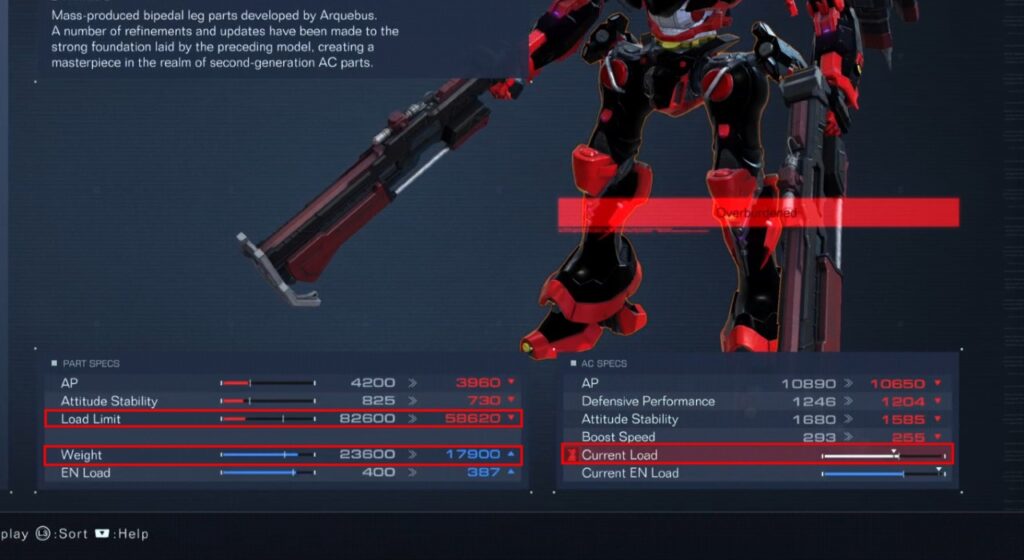
In addition to editing your AC, there is also an OS Upgrade that you can unlock that will allow you to play missions while Overburdened. This is the Weight Control Upgrade which will not only allow you to enter a mission while carrying too much weight, but it also unlocks the ability to Purge Weapons. This will allow you to drop weapons as you play the mission, lowering your weight instantly. Be aware that going into a mission Overburdened will greatly lower your movement abilities. Purging your weapons will allow you to start a level with a lot of equipment and then drop weight as you need to gain speed.
Stay tuned to Gameranx for future news, updates, and guides for Armored Core 6: Fires of Rubicon.


