The Last Wish raid is the toughest challenge in Destiny 2: Forsaken — and it is packed with secrets, including an incredibly creative little Easter egg that lets Guardians make “wishes”. By finding a hidden chamber, you can input codes that give you a selection of different “wishes” — depending on the code, you can warp around the raid lair, listen to silly Easter egg songs, or generate party-popping Easter egg effects when you kill enemies.
There are lots of crazy wishes, and we’re still trying to figure them all out. The incredible fans over at r/RaidSecrets discovered this room and the secrets therein. User banjoses compiled many of these wish Easter eggs, and User Blu3MisT found the room itself. They deserve all the accolades for these crazy discoveries. In many ways, this weird Easter egg is pretty similar (and even references) secrets from the old days of Bungie, when they were still developing the Halo series.
More Destiny 2: Forsaken guides on Gameranx:
- Destiny 2: Forsaken – Last Wish Raid Guide | How To Beat Every Boss & Puzzle Encounter
- Destiny 2: Forsaken – 8 Essential Tips To Help You Master Gambit Mode | Beginner’s Guide
- Destiny 2: Forsaken – How To Find Every Exotic Weapon (So Far) | Exotics Guide
How To Make Wishes In The ‘Last Wish’ Raid | Secrets Guide


Anyone can access the secret wish room in ‘The Last Wish’ raid. It’s located before the first encounter, and before you’ll fight any enemies. You can check out the room solo if you’re curious.
- To find the room early in the raid, before fighting any enemies, look for grass-covered platforms with glowing blue plants. Jump up the long path to reach the “Wall of Wishes” at the very top.
- Right before entering the first boss arena through the cavern door, look left for an open cavern with water below. Jump around the corner to the right to find the first grassy, blue-lit landing.
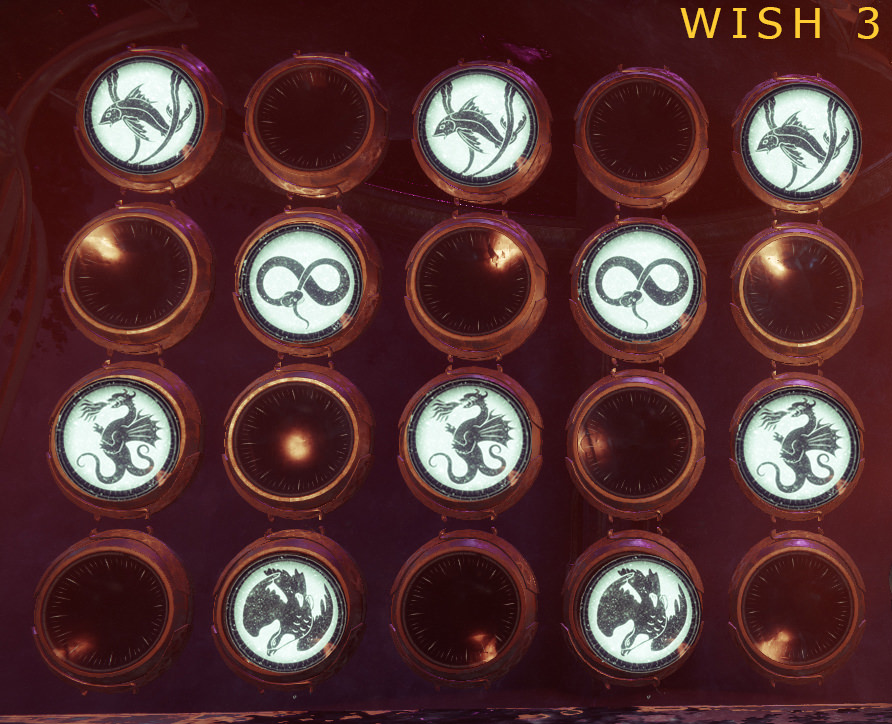
The “Wall of Wishes” is covered in dials. You can shoot the dials to match lay-outs found on clues sprinkled across the Destiny 2 universe. Input the “Code” in the dials by matching the position of the pattern, and you’ll unlock a “Wish” — different effects that will occur in ‘The Last Wish Raid’. To input a code, step on the big pressure pad in the center.

Below is a quick list of all the wishes and effects the community has found so far. Clear images in the links below are by User stoerse015.
- A wish for others to celebrate your success. Gives you the “Numbers of Power” emblem.
- A wish for material validation. Spawns a Raid Chest (Requires Glittering Key) between Morgeth and the puzzle Vault.
- A wish to stay here forever. Plays “Hope for the Future” song.
- An Easter egg — everyone know that Paul McCartney song is completely ridiculous.
- A wish to stay here forever. Adds birthday streamer pops to headshots during the raid.
- This is very likely reference to the “Grunt Birthday Party” effect from the Halo series.
- A wish to open your mind to new ideas. Adds random special effects to Guardian heads.
- A wish to look athletic and elegant. Teleports you to the Shuro-Chi boss encounter.
- A wish for a promising future. Teleports you to the Morgeth encounter.
- A wish to move the hands of time. Teleports you to the Vault puzzle.
- A wish to help a friend in need. Teleports you to Riven.
More Destiny 2: Forsaken guides on Gameranx:
- Destiny 2: Forsaken – How To Activate Heroic Tangled Shore Public Events | Heroic Guide
- Destiny 2: Forsaken – How To Activate Heroic Dreaming City Public Events | Heroic Guide
- Destiny 2: Forsaken – How To Unlock New Supers | Visions of Light Guide
- Destiny 2: Forsaken – Paul McCartney Returns In This Hilarious Lost Sector | Easter Egg Guide
- Destiny 2: Forsaken – All Region Chests Locations Guide | Tangled Shore
- Destiny 2: Forsaken – All Region Chests Locations Guide | The Dreaming City
- Destiny 2: Forsaken – How To Unlock The Dreaming City | Awoken Talisman Quest Guide
- Destiny 2: Forsaken – How To Use Small Gifts & Secret Cats | Reverie Armor Unlock Guide