
• Skip to main content
  • Skip to header right navigation
  • Skip to site footer
Gameranx

Gameranx

Video Game News, Lists & Guides

  • News
  • Features
  • Platforms
    • Xbox Series X
    • PS5
    • Nintendo
  • Videos
  • Upcoming Games
  • Guides

Call of Duty: Modern Warfare – How To Play Hardcore Mode | Multiplayer Guide

October 29, 2019 by Kevin Thielenhaus

Hardcore Mode is surprisingly hard to find in Call of Duty: Modern Warfare. Here’s how to find it.

Realism Mode is an all-new feature in Call of Duty: Modern Warfare, removing the minimap and every visual HUD element, turning every multiplayer match into an incredibly tense tactical shooter.

Realism Mode is awesome, but many players are wondering — what happened to Hardcore? Hardcore, which is a happy medium between standard multiplayer and Realism, is still in Call of Duty: Modern Warfare. Finding it isn’t so easy, though.

Lots of players are complaining that Hardcore Mode is basically hidden. It isn’t easy to find, and you’ll have to dig through menus to create your own Hardcore match. Here, I’m going to explain how to activate Hardcore (and Realism) Modes in multiplayer.


More Call of Duty: Modern Warfare guides:

  • Call of Duty: Modern Warfare – 10 Totally New Features, Modes & Secret Settings | Beginner’s Guide
  • Call of Duty: Modern Warfare – The Best Guns To Use In Multiplayer | Loadout Guide
  • Call of Duty: Modern Warfare – Best Mode To Play To Rank Up Fast| Multiplayer XP Guide
  • Call of Duty: Modern Warfare – Ending Explained | References, Easter Eggs & Sequel Hints

How To Play Hardcore Mode |Multiplayer Guide
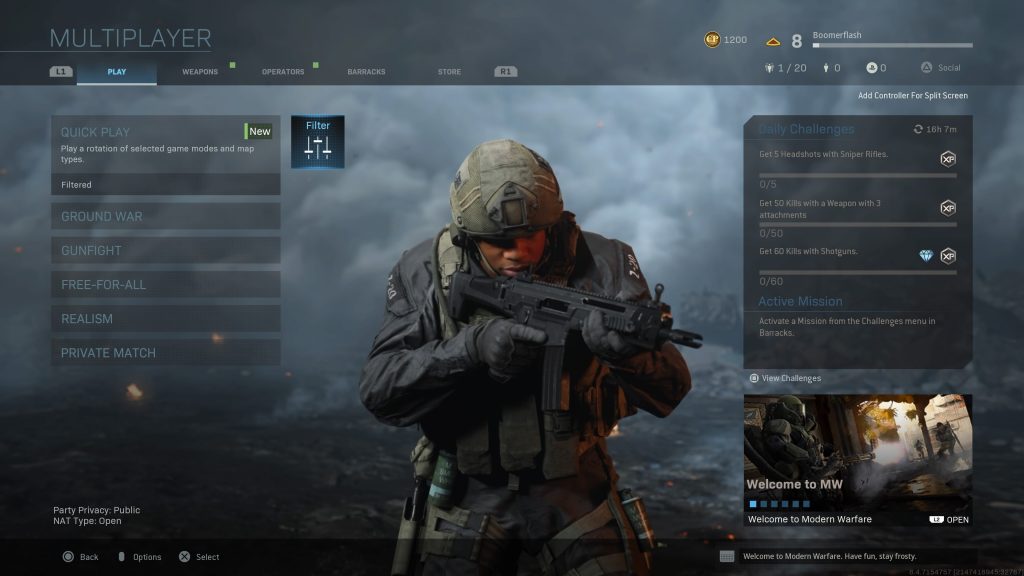
Want to play Hardcore Mode? You have to use the Filter option.

To play all types of matches in Hardcore Mode, select ‘Filter‘ — it’s next to ‘Quickplay‘. At the Quick Play Filter Menu, press R [PC] / Square [PS4] / X [XBO]. That selects the Hardcore Quick Play Playlist.

Now, you can select five different Hardcore game modes; HC Team Deathmatch, HC Cyber Attack, HC Domination, HC Search and Destroy, and HC Headquarters.

Playing Realism is much easier. Just select the ‘Realism‘ Multiplayer mode, it’s right above ‘Private Match‘.

Now, if you want to setup your own Realism / Hard Core match, that’s a little bit tricky too.

  • Go to ‘Private Match’ -> ‘Custom Game / Local Game’ -> ‘Game Setup’.

Select the ‘Game Rules’ menu, then select the ‘Gameplay’ tab. Here, you’ll find Hardcore Mode and Realism Mode, which you can toggle Disabled / Enabled. It’s definitely a little more hidden this time around.

Share this post:

FacebookTwitterLinkedInPinterest

Recent Videos

10 BIGGEST REVEALS of Summer Game Fest 2026

10 BIGGEST REVEALS of Summer Game Fest 2026

CDPROJEKT RED NEW OPEN WORLD GAME, PS5 EXCLUSIVE SALES CRASHING? & MORE

CDPROJEKT RED NEW OPEN WORLD GAME, PS5 EXCLUSIVE SALES CRASHING? & MORE

10 Games That Are DEEPER THAN WE THOUGHT

10 Games That Are DEEPER THAN WE THOUGHT

Fatekeeper - Before You Buy

Fatekeeper - Before You Buy

10 BIG Announcements of State of Play June 2026

10 BIG Announcements of State of Play June 2026

Why This Witcher 3 Expansion Is Such A Big Deal

Why This Witcher 3 Expansion Is Such A Big Deal

30 RPGs of 2026 That Look Too Good to Ignore

30 RPGs of 2026 That Look Too Good to Ignore

Top 20 NEW Story Based Games of 2026

Top 20 NEW Story Based Games of 2026

10 WEIRD Gaming Stories of May 2026

10 WEIRD Gaming Stories of May 2026

Category: FeaturesTag: Call of Duty: Modern Warfare, Guides, PC, PS4, Xbox One

Sidebar

Recent Posts

  • “It Was An Xbox Decision” – Satya Nadella Gave Asha Sharma “Latitude” To Cancel CoPilot On Xbox
  • Atlus Warns Public After Katsura Hashino Impersonator Fools Persona and Metaphor ReFantazio Fans
  • Elden Ring Tarnished Edition Releasing On Nintendo Switch 2 This August 28
  • Steam Machine and Steam Frame Are Releasing This Summer 2026
  • Xbox CEO Asha Sharma Discusses Gaming Hardware Crisis “We’re Not Talking About,” Believes They Shouldn’t Raise Prices On Helix

Copyright © 2026 · Gameranx · All Rights Reserved · Powered by Mai Theme

