
If you own an Xbox Series X or PlayStation 5, you have probably been waiting for games that take advantage of your advanced hardware. With the release of The Callisto Protocol, we are getting a next-gen exclusive that either looks stunning or runs incredible smooth. The optimal word to highlight in that sentence is either, since the console versions of The Callisto Protocol have a Performance and Graphics mode toggle.
Unfortunately, the game doesn’t immediately communicate how to turn Performance Mode on. By default, this setting is off and can only be changed via the main menu. If you prefer a smooth 60 FPS experience, you will have to endure a slight graphical downgrade. You can change this on or off in the Graphics settings whenever you please.
Note that this only applies to Callisto Protocol players who have the game on Xbox Series X/S or PS5. PC players will have a more complex array of graphics options at their disposal.
More The Callisto Protocol Stories:
The Callisto Protocol Isn’t Getting New Game+ Until Next Year | How to Get All Implant Bios in Chapters 1 & 2 | How to Get All Implant Bios in Chapter 3 |
How to Toggle Performance Mode On and Off
In The Callisto Protocol, you are not able to toggle Performance Mode on and off while in the game. If you are in-game and wish to adjust which graphics mode the game is running in, you must exit to the main menu.
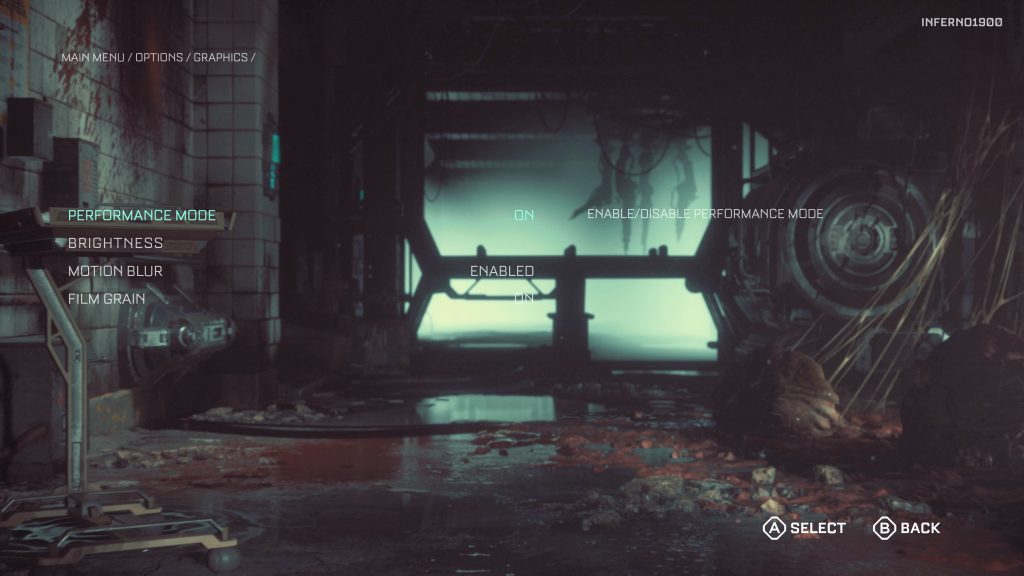
Once you’re on the main menu, you can now go to Graphics in the Options menus. The first option once you go into the Graphics settings menu will now be a toggle to turn Performance mode on and off (a toggle that does not appear if you bring the same menu up in-game). Turned off by default, this mode will focus the console’s horsepower on rendering in 4K at 30 frames per second with the addition Ray Tracing. When you turn Performance Mode on, the game will run at 60 FPS at a lower resolution.
Both modes come with their advantages as well as downsides compared to the other mode. It’s up to you to figure out if you prefer cutting edge visuals or a smooth silky frame rate. Either way, your Callisto Protocol gameplay experience is bound to be better than the poor players who bought the PC version of the game at launch.