

Rollerdrome can be a tough game if it’s your first time playing a skating game. Even if it isn’t your first dip into the genre, it can be tricky to get the hang of as it mixes in elements from third-person shooters that, while certainly making the game unique, can result in some crossed wires inside players’ brains.
Having unique mechanics isn’t an issue by any means, but because the game gates off new levels in its campaign by the number of in-game challenges that the player has completed, it means that some will come grinding to a halt if they haven’t completed the required challenges. Luckily, there’s a way to bypass the game’s challenge requirements completely.
More Rollerdrome guides:
| How to Reload | Untouchable Trophy Guide | Perfect Dodge Guide | How to Perform All Grabs | How to Perform All Grinds | Out For Blood Mode Explained |
Rollerdrome‘s Challenge Bypass
Rollerdrome includes a lot of excellent accessibility features within its menus to make the game tailored better to individual players. Such settings include things like invincibility mode and precise damage scaling, game speed options, and the ability to completely negate the challenge requirements that lock campaign progress behind completed challenges.
This is a great setting that opens the game up for anyone, regardless of how many challenges they can complete. With the setting turned on, you’ll unlock levels as you make your way through the story and won’t be hindered by completing challenges if they’re not your style.
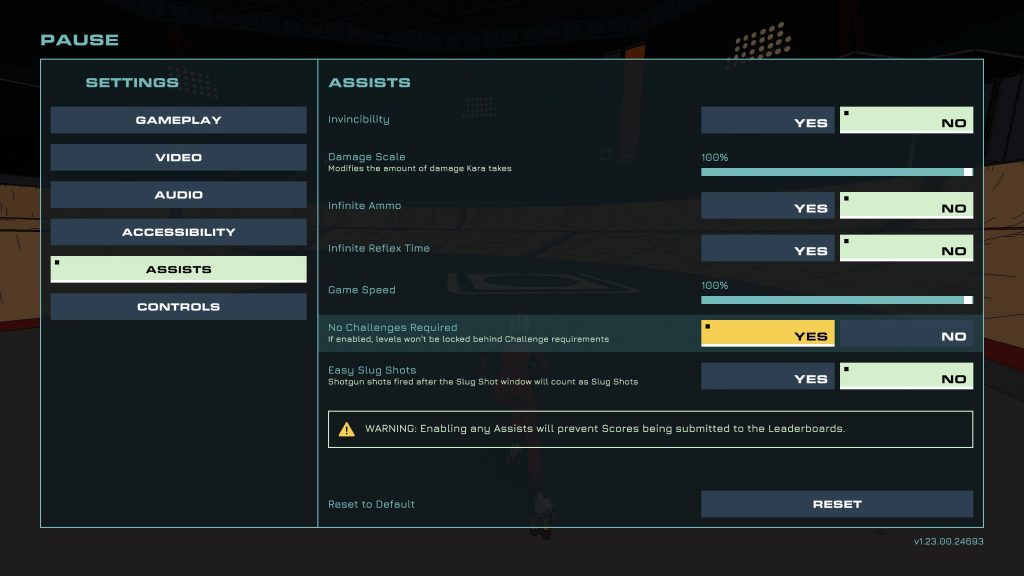
It’s important to note that turning on any of the settings in the Assists menu will disqualify you from placing on online leaderboards, so keep that in mind if you’re looking to make use out of any of the game’s options.
To turn on Rollerdrome‘s challenge bypass, head to the settings menu either from the start or pause menu and select “settings,” then “assists.” In the assist menu, turn “No Challenge Required” to “Yes” and you’ll be completely free from any completion requirements.







