
There’s a great feature surrounding Virtual Game Cards that you may not have realized was even possible.
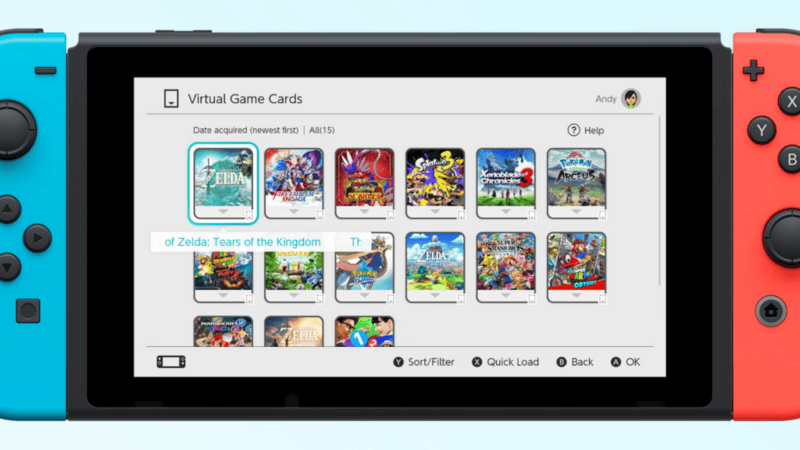
For those of you who already upgraded your Switch consoles, you will already know that there are new icons at the bottom of the home screen for GameShare and Virtual Game Cards. As of this writing, Virtual Game Cards is a new way to access and modify your Switch digital library, aside from accessing All Software by scrolling far right at your home screen, or by looking at your list of purchased games from the eShop.
But as it turns out, your Virtual Game Cards can also be accessed on the web! After logging in your Nintendo Account, you can see your Virtual Game Card library here. You have the same options on the web and using the Switch, and we’ll elaborate on that below.
For one, you get a row of five games each, represented as if they are Game Cards. By default, they’re organized by date of the latest games you’ve acquired, but you can also choose to organize from the oldest game acquired, by game title, and by publisher. There are also filters for games based on which of your consoles they are downloaded in, and whether they are software, DLC, and upgrade packs. You can also select multiple games.
On the bad side, there’s no option to type in words to search, at least for now. You also can’t choose to select games by folder. This makes us think that folders are localized completely to your individual system. Whether Nintendo can remedy that or not, if you have a big library of digital Switch games, this does it make it that much harder to find and manage them.
When you select a game, you can see what system it is installed in, and you immediately get the choice to load it on other systems. There’s a separate options button, which then lets you choose to eject from a system, view details, and most interestingly, to hide your game.
As Twitter user Coxxs pointed out, hiding your game from Virtual Game Cards is a ‘very important feature’. There will be games that you will want to hide from your friends and family, so that they would not be able to even ask you if you can borrow it from them.
Of course, even if you access the Virtual Game Cards webpage, you’ll still need to physically manage any transfers between your Switch systems. We did test firsthand that after the systems are connected, you can facilitate any transers on one system. We also assume if you have a game that isn’t downloaded on any system, you can just use the web and one system to access it.
Because there’s no ability to enter words to search for games, it may be more convenient to go to the web to scroll for the games you’re looking for. This will all probably be easier on the Switch 2 using mouse mode, but hopefully, Nintendo will add more features for this in the future as well.








