
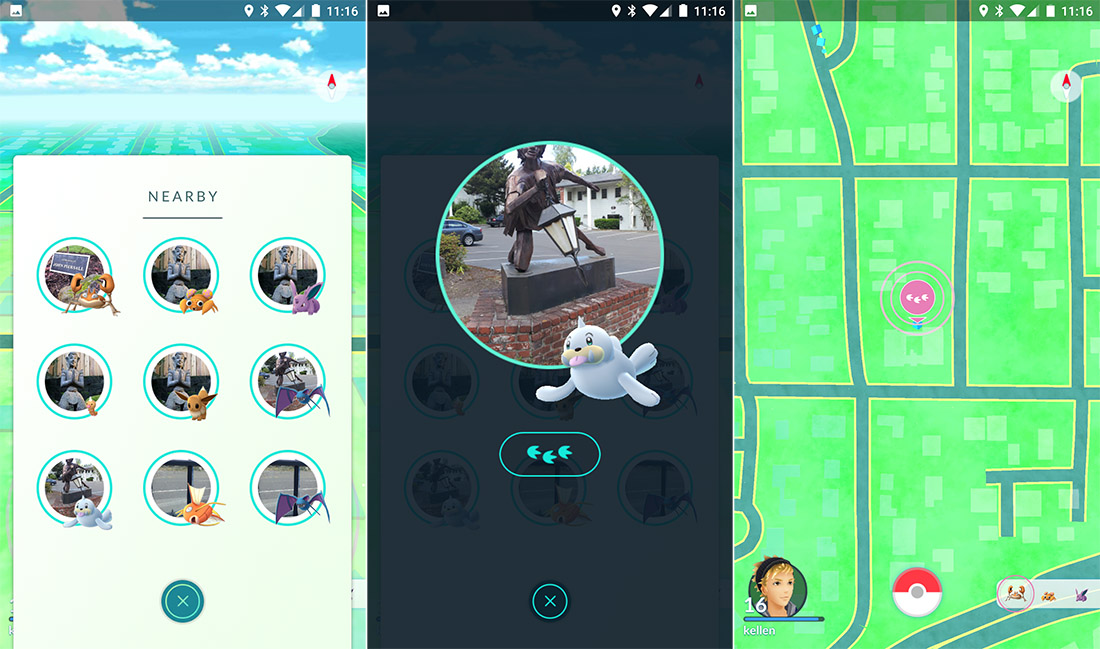
Catching Pokemon in Pokemon GO hasn’t been so easy in recent months, but now things are different — Niantic, the developers of Pokemon GO, have finally extended the Nearby Feature to cover the entire US and UK, pointing out Pokemon and showing you exactly how to find the ‘mon you want.
It’s worth noting that the Sighting Feature is gone completely — although fans in the San Francisco area (Niantic’s home town) say that both Sighting and Nearby is up and running. We’ll have to see what happens, but Pokemon GO has a long future, and lots of changes are incoming for the massive update rumored to arrive in December that will include new Generation Pokemon, trading, and tons more stuff fans have been begging for.
More Pokemon GO tips, tricks, and FAQs:
- Pokemon GO: 9 Essential Tips, Tricks & Answers To Your Questions
- Pokemon GO: Get Perfect Pokeball Throws With AssistiveTouch
- Pokemon GO: How to Fix Frozen Pokeballs – Bug Solution Guide
- Pokemon GO: 4 Tips to Save Battery Life & Capture Outside Longer
- Pokemon GO: How to Earn Coins (Fast) & What They’re Used For
- Pokemon GO: Where to Find (And Catch) Pokemon | Spawn Locations
- Pokemon GO: iOS & Android Compatibility – Which Versions Work
- Pokemon GO: How to Take In-Game Screenshots
The Nearby Feature — How It Works
NOTE: The Nearby Feature is currently available in the continental US, Canada, Australia, UK, and some parts of Europe.
To catch Nearby Pokemon, first find a Pokestop in your town / city. While exploring, follow these steps;
- Tap the Nearby Screen on the Map View
- Touch the Pokemon from the list you want to capture.
- A nearby Pokestop will be shown. Touch again.
- A trail of paw-prints will appear on your map.
Follow the paw prints to reach the location where the Pokemon will appear, and you’ll get a chance to battle / capture a wild Pokemon!
More Pokemon GO tips, tricks, and FAQs:
- Pokemon GO: Get All 3 Eeveelutions Every Time
- Pokemon GO: How to Become A Gym Leader
- Pokemon GO: Easy Ways to Earn XP & Level Up Fast
- Pokemon GO: Is It Out In Your Country? | Availability List
- Pokemon GO: All the Moves, Ranked Best to Worst | Complete List
- Pokemon GO: 6 Essential Facts You Need to Know About the Buddy System
Image Source: [1]


