
Table of Contents[Hide][Show]
Overwatch 2 is out now, as of 12pm PDT/3pm EST on October 4. The sequel to Blizzard’s hit hero shooter makes a number of changes, but keeps the foundation of Overwatch the same. That includes the ability to play alongside players on any platform by using Blizzard’s proprietary Battle.net.
While the original Overwatch had separate progressions between console versions and PC, that is all now unified via Battle.net in Overwatch 2.
More Overwatch 2 Stories:
Overwatch 2 Requires Grind to Unlock Role Queue | Overwatch 2 Wants to Have Other Brands Crossover into Title | Overwatch 2 Players Reporting Issues With Phone Verification | Overwatch 2 Grind For Old Heroes Is Real | Blizzard Encourages Overwatch Fans To Post Memories As Servers Shut Down
Is Overwatch 2 Crossplay?
Yes, like the game that came before it, Overwatch 2 supports crossplay across all platforms which include PS4, PS5, PC, Nintendo Switch, Xbox One, and Xbox Series S/X. By using Battle.net for its player accounts, Overwatch 2 allows crossplay between every platform.
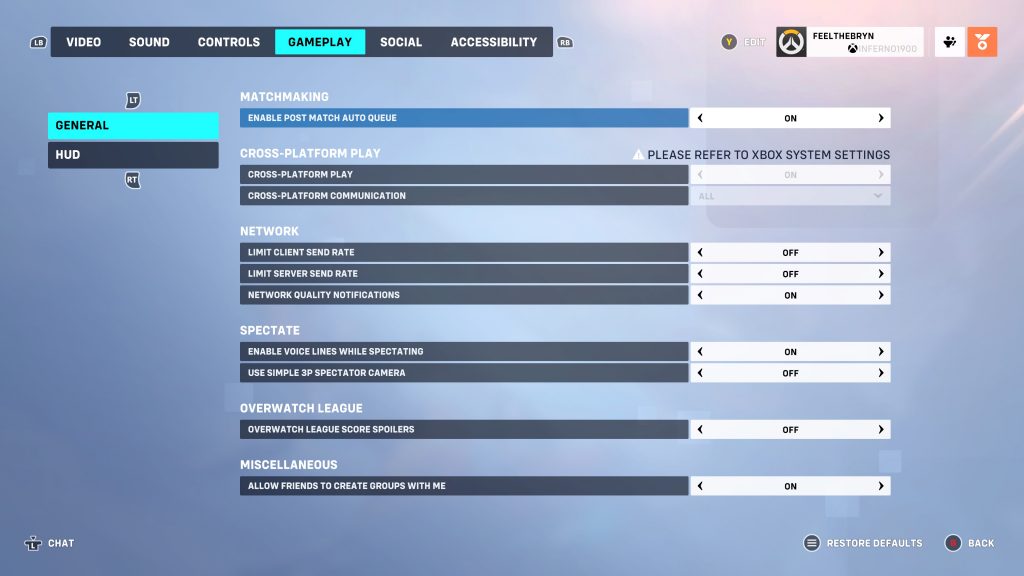
If you go into the menu, you will be able to adjust your cross-platform play settings. By default, crossplay is turned on. You can turn it off by going to Options in the menu. From here, mouse over to Gameplay and look under General where the Cross-Platform Play toggle will be the second option listed.
Note that if you are playing on an Xbox console, you will have to adjust crossplay settings on a system level.
Does Overwatch 2 have Cross-Progression?
Overwatch 2 supports cross-progression between systems. If you own the game on multiple platforms, you will be able to access all your unlockables, skins, and maintain your player level across all versions of the game. You first just have to Merge Accounts, which should take no time at all.
When you first boot up Overwatch 2, you will be prompted to Merge Accounts. This is the best time to follow the steps and do so. This will ensure that no matter which platform you play Overwatch 2 on, your progression will be linked to your Battle.net account. All unlocked character levels, Battle Pass progression, and skins will carry with you from platform to platform.








