

You’re in the middle of an intense GTA Online gaming session, but you get a call in the real world. It’s avoidable but now you need to step away from the game. Maybe you know it won’t take too long to finish whatever task that needs your attention, but you also know that if you don’t move for long enough, you will be booted from the server. Then you’ll be forced to wait however long for a chance to hop back into another. You can only scroll so much on social media, we know the feeling. There are a couple ways to go AFK, but RockStar is pretty quick to patch out clever tricks players have come up with. What works currently? Find out here.
How do I go AFK in GTA Online?
- Rubber band/weight method
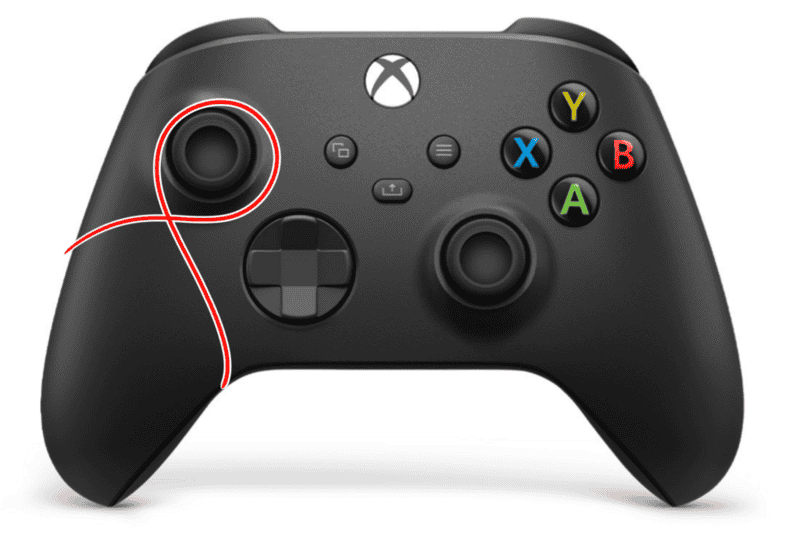
Let’s go ahead and get this one out of the way. It’s tried and true, always reliable. Players have been using these methods since the concept of getting booted was introduced! To do this, you have a few options. Using a rubber band or a hair-tie, loop around the movement joystick then twist and loop around another section of the controller. Spots like the around the grip, or the camera joystick are good spots. If instead you’re on keyboard, place a small weight on one of the movement keys so that your character walks around. Also, make sure your character is somewhere safe to wander around aimlessly.
The only downside of this method? Stick drift, possibly. While holding one direction doesn’t necessarily cause it, it can affect the wearing and tearing longevity, which can lead to the annoying drift more quickly.
Don’t have a hair tie nearby? Honestly it’s possible to do this method by just flipping the controller upside down and leaning the controller on the movement stick so that it’s shifted, in a safe place where it’s not likely to be disturbed.
- D-Pad or RB buttons
Another physical way to sidestep Rockstar’s attempts to boot AFK players from servers. This method is also easy, but requires a safe place to keep your controller where it won’t be disturbed by anyone else. For this, simply open the menu and hold RB or LB. Ways to hold one of these buttons down are:
- Use a piece of tape to tightly tape down the button to where it’s constantly activated.
- Wedge the controller in between two heavy objects to where one object is pressing the button.
- Put the controller on its side where the top buttons are facing down, and place a small object like a folded piece of paper underneath the RB or LB button. For this, you will likely need to lean the controller against something like a water bottle to keep it from tipping over.
Upside to this method over the classic rubber band? No stick drift, and very minimal wear and tear. Also using any physical method is the only way that can’t be patched out.
Downside? Depending on what console and controller you’re using for this method, it’s possible for your controller to cut off after a certain amount of time, rendering the button presses useless.
- Auto-clicker (PC Only)
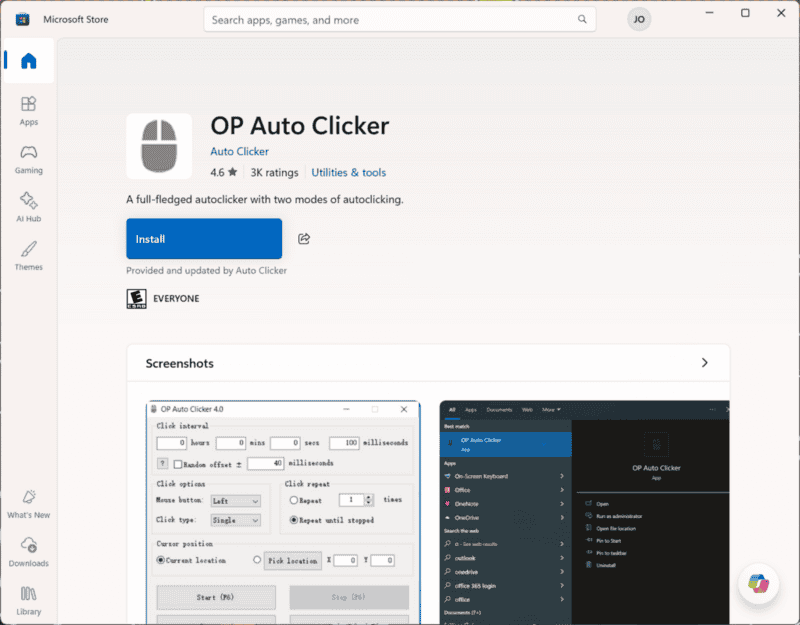
This is also very easy to use. There are a multitude of auto-clickers available to download. But if you’re using Windows, it’s even easier. Typing in “auto” will bring up OP Auto Clicker under the Store section. This application is free to download and easy to set up. Choose your click interval, anything under 15 minutes of course, and choose which mouse button you want. Make sure that the click option for Repeat until stopped is filled in and you’re ready to start!
Another auto-clicker users rely on is AutoClicker.Io. This one is also free to download and use, and is relatively safe.
Though make note, either of these applications, or any trusted auto-clickers in general, are only safe to use if downloaded through the official store or website.
As you may notice, most of these are physical methods. Currently, unless using unreliable glitches, most previously known methods have been patched out. This may be frustrating to all of us who use AFK methods to deal with real life activities that need our attention and still be able to stay in a session with friends, or to bring in passive income through places like nightclubs. We understand they have their reasons, but frankly, most of us don’t care!





