
Table of Contents[Hide][Show]
Assassin’s Creed Shadows adds settings we haven’t seen in many other games — and a lot of these settings aren’t totally clear how they work. Some of the settings some really cool, like an Immersive Mode where all characters speak their native languages instead of the translated versions we’re hearing. That means Japanese characters speak Japanese and Portuguese characters Portuguese. But that is a totally cosmetic setting — there are other settings that just might make or break your enjoyment of the game.
At the start, here are the settings we think you’ll want to change. There are four major settings you can toggle on / off in the Options menu, and some are more useful than others. Some of these settings can actually make your experience much, much worse so we’ll separate this guide into useful features and not-so-useful features.
Settings To Change First
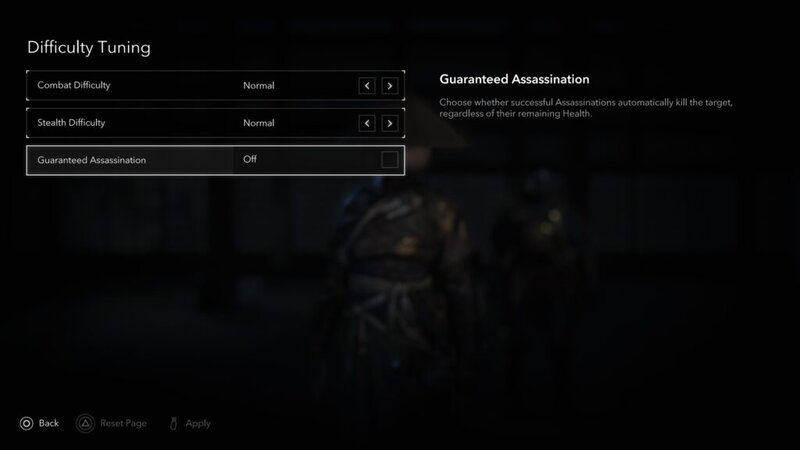
These are settings you’ll want to check out first. Decide if you’d like to turn them on or test them — you might not even know these settings exist!
Guaranteed Assassination: Go to Options -> Gameplay -> Difficulty Tuning to find this setting. This setting, when toggled on, causes your character to always successfully assassinate an enemy no matter your level or gear, making this more similar to old-school Assassin’s Creed games.
Guided Exploration Mode: Found under Options -> Gameplay, this setting adds simplified objective markers — it also makes finding where you need to go so much easier. This game is much more difficult to navigate than other games, so if you’re lost and confused, turn this setting on.
Area Loot: Under Options -> Gameplay, toggle on this setting immediately to collect everything. This only works when looting a group of dead enemies — it doesn’t always collect a load of loot in rooms. It’s OFF by default, but there’s no reason not to use it. It’s a basic function of other games ad doesn’t break the experience — it’s how the game was intended to be played.
Auto-Movement: Found under the Controls -> Controller tab in the Options menu, this allows you to activate auto-movement by double-tapping the climb button. You’ll retain your speed when sprinting too.
Settings You May Not Want To Change
These settings might be useful for you but take a good look before turning them on. Some of these settings are broken as of this writing.
Stealth Difficulty: Expert – This setting makes for a more engaging stealth experience, as enemies can detect you faster. Enemies are also more likely to look up and spot you on rooftops.
- NOTE: There’s a big downside — the game wasn’t designed for this setting and after testing, we’ve been caught in Stealth while completing tutorials or other main story specific stages of the game. This seems totally unintentional, so hopefully future patches will fix these issues.
Canon Mode: When starting a new game, you can select Canon Mode as one of the options. This mode automatically selects different dialogue options, but there’s a big problem with this mode — it will select non-ideal dialogue options, so you are blocked from getting the best possible solution from side-quests.
This mode even blocks you from gaining all allies. Because of the canon choices, you will be completely unable to recruit at least one of the allies.





