
• Skip to main content
  • Skip to header right navigation
  • Skip to site footer
Gameranx

Gameranx

Video Game News, Lists & Guides

  • News
  • Features
  • Platforms
    • Xbox Series X
    • PS5
    • Nintendo
  • Videos
  • Upcoming Games
  • Guides

30 Fortnite: Battle Royale Secrets & Settings The GAME DOESN’T TELL YOU

May 26, 2018 by Kevin Thielenhaus

Stay competitive in Fortnite: Battle Royale with 30 secrets and settings you really need to know. From controller configurations, to graphics settings, to in-game secrets, here’s all the vital information the game doesn’t explain..

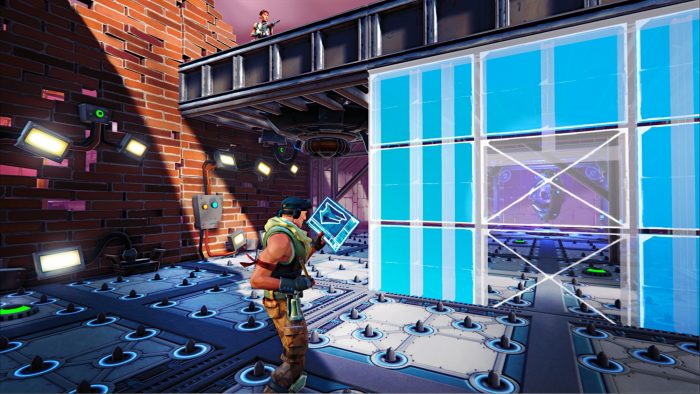
#8 Speed Up Construction With The Turbo Building Option

While this setting is ON by default, you might not realize exactly how it works. Essentially, you can hold down the build button while in Builder mode and instantly queue another construction. You can save yourself some clicks in stressful situations — instead of selecting your build option then holding the button, all you need to do is hold the build button then flip through the different options.

If that doesn’t make much sense, just think of it this way — you can continue to hold down build, then build a wall, a floor, a pyramid, or a ramp all without letting go of the button. You just need to be quick with your build selections. Keep your cursor on the wrong thing, and that’s a wasted build. At least if it’s a wall, that really can’t hurt.

#7 Ways You Can Improve FPS On Console [PS4 / XBO]

If you don’t have an Xbox One X or a PS4 Pro, then you won’t have 60 FPS mode. Instead, you’re (pretty much) locked at a steady 30 FPS that can drop sometimes. If you’re worried about your FPS, and feel like it might be dipping a little too much, there are a few steps you can take to improve stability and keep your copy of Fortnite running better.

  • On PS4 / Xbox One: Disable Streamer Mode
  • On PS4 / Xbox One: Disable Replays – Record Replays & Record Large Team Replays (Especially!)
  • On PS4 / Xbox One: Install Fortnite on your console’s internal memory HD. If it is saved on an external HD, you may experience problems.
  • On PS4: Make sure all windows are closed in the Internet Browser app.
Pages: Page 1 Page 2 Page 3 Page 4 Page 5 Page 6 Page 7 Page 8 Page 9 Page 10 Page 11 Page 12 Page 13 Page 14 Page 15

Share this post:

FacebookTwitterLinkedInPinterest

Recent Videos

10 WEIRD Gaming Stories of April 2026

10 WEIRD Gaming Stories of April 2026

ROCKSTAR RESPONDS TO GTA 6 PRICE & MORE

ROCKSTAR RESPONDS TO GTA 6 PRICE & MORE

Invincible VS - Before You Buy

Invincible VS - Before You Buy

What The HELL Is Going On With PlayStation DRM?

What The HELL Is Going On With PlayStation DRM?

10 BIGGEST Lies Ever Told by Developers

10 BIGGEST Lies Ever Told by Developers

Diablo 4: Lord of Hatred - Before You Buy

Diablo 4: Lord of Hatred - Before You Buy

20 Upcoming SMALLER Games of 2026 That Excite Us

20 Upcoming SMALLER Games of 2026 That Excite Us

Top 10 NEW Games of May 2026

Top 10 NEW Games of May 2026

20 Insane Things Games Did That NOBODY NOTICED

20 Insane Things Games Did That NOBODY NOTICED

Category: FeaturesTag: Fortnite, Guides, iOS, PC, PS4, Xbox One

Sidebar

Recent Posts

  • Sonic Racing CrossWorlds Should Be Having A Free Play Steam Weekend – But Denuvo Is Blocking It
  • Fortnite Unleashes A Galaxy Of Experiences For Star Wars Day
  • Final Fantasy XIV Will Support Switch 2’s Mouse Mode, And Also Mouse And Keyboard
  • BoxBoy! + BoxGirl! Gets Rating For Nintendo Switch 2
  • LEGO Batman Legacy of the Dark Knight Has Gone Gold

Copyright © 2026 · Gameranx · All Rights Reserved · Powered by Mai Theme

