
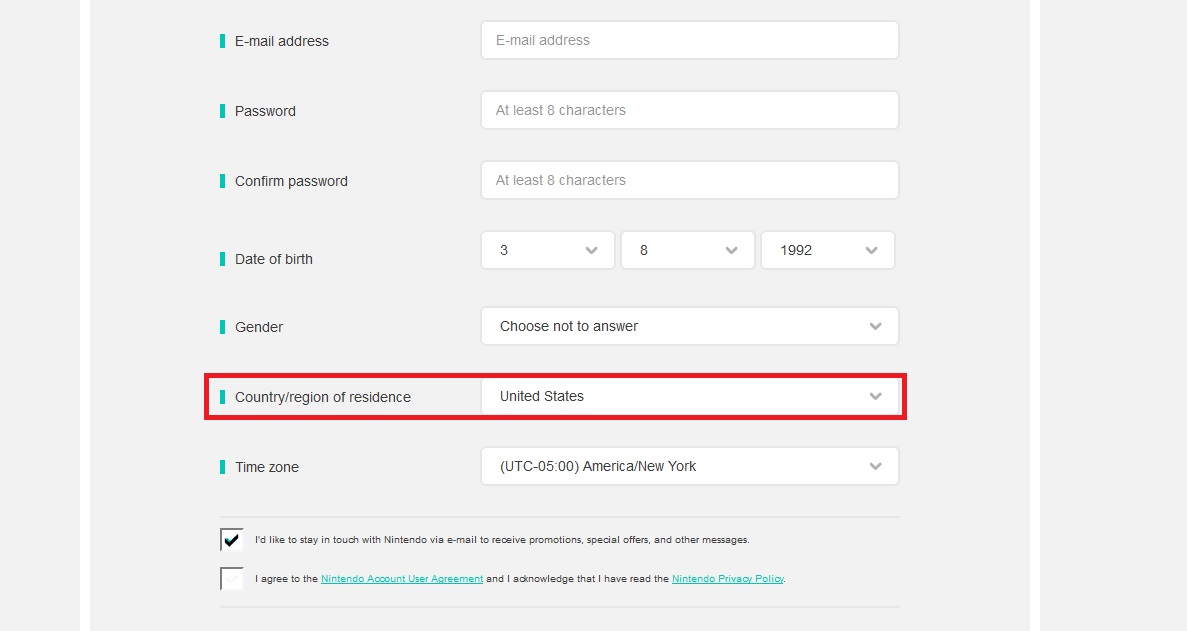
For once, accessing any region’s eShop is incredibly simple. All you need is a Nintendo account, a Switch profile to link, and the desire to browse through Japan, US, or UK only eShops. It’s all pretty simple, but we’ll walk you through the steps with our guide below.
Just be aware — there aren’t many eShop games yet. There’s a total of nine picks, and there isn’t even any music yet! You’ll need to get online and download the latest updates before the eShop is even available too, so don’t try rush ahead. Think of this as an investment in the future. There are some awesome Japan-only eShop games available across Nintendo’s many consoles, so why not get setup now?
This method is already spreading around like wildfire, but we picked it up from Youtuber Arekkz Gaming. Check out his channel here.
How to Access Regional eShops | US, Japan, Europe, Etc
NOTE: To access ANY eShop features, you’ll have to connect to the internet and download the day-one patch for the Nintendo Switch.
All you have to do to access any region’s eShop is create a Nintendo Account / Switch Profile for that region.
- Start by creating a Nintendo Account here.
- When creating your account, select the Country/region of residence of the eShop you want to access.
- Japan / UK / US can be accessed here, and many more.
- Use a real e-mail account. Nintendo will send a verification code after completing registration.
- After creating / verifying your account, get on the Switch and create a new profile.
- Use your new profile to link to your new Nintendo Account with the country / region you want to access.
- Now use your new profile to access the eShop and voila! You now have full access to a different region’s eShop.
It’s just that easy. There’s nothing tricky you’ll have to pull. This is all allowed by Nintendo, who have removed region locks from all future titles released on the Switch. You’re free to access games that are exclusive to other regions whenever you want.
More Nintendo Switch info on Gameranx:
- Nintendo Switch: Upgrade Your Storage With These MicroSD Best Buys
- Nintendo Switch: Every Game Available on Launch Day (And Beyond!)
- Nintendo Switch: How to Add Friends & Send Friend Requests
- Nintendo Switch: How to Avoid Breaking Your Joy-Con Wrist Straps
- Nintendo Switch: 12 Awesome Little Features You Might Not Know About
- Nintendo Switch: There’s An Easter Egg On Startup, Check It Out Here
- Nintendo Switch: How to Take (And Share) Screenshots
- Nintendo Switch: Price, Release Date, Specs, Games & Everything Else You Need To Know
- Nintendo Switch: 8 New Features (And Games) We Know About So Far







