
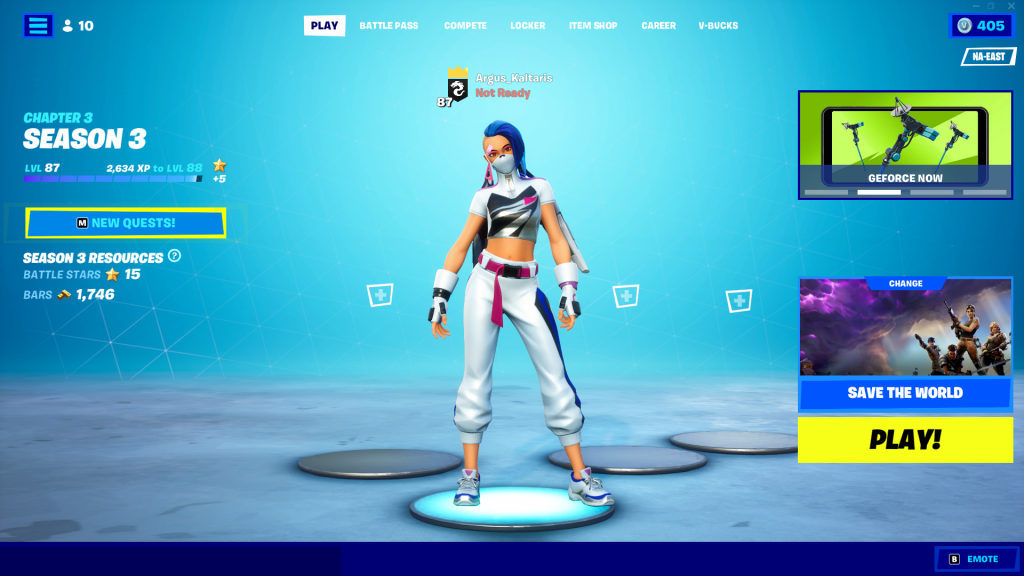
Fortnite: Battle Royale doesn’t just demand your time and attention — this game demands you keep a schedule to get all new stuff on offer like Goku skins. A wasted day can mean missing important events, and one of the most annoyingly persistent bugs is the Blue Screen Lobby error. Seemingly due to errors in patch installation, the blue screen lobby makes playing a pain. Luckily, players have been circulating an easy solution for everyone caught in the infinite blue screen loop.
Sometimes the lobby is just blue. Sometimes it causes crashes or audio issues when you hop into an actual game. Either way, you’ll want to get rid of it ASAP.
More Fortnite Chapter 3 guides:
How To Get Kamehameha & Nimbus Cloud | How To Watch Episodes Of DBZ: Super | How To Join A Versus Battle | Where to Find a Zero Point Fish | Prime Shotgun Locations Guide | How to Unlock Indiana Jones Skin | The Ruins Location Guide
How To Fix The Blue Lobby Bug
The bug seemingly occurs on PC and console — and it can be fixed on both versions without requiring a reinstall.
- Open the Settings Menu and navigate to the Language Selection.
- Change your language to any other language. For example: English (US) to English (UK) will work.
- Change your language back to your native language.
And that’s it! Just changing this setting will fix the issue. You need to make sure the language change is confirmed, then you can swap it back to your normal language. This will work with any language — as long as you swap languages on the menu from your default, doing this will get rid of this dreaded bug.
The blue lobby bug has been a persistent problem, appearing recently during the Chapter 3 launch and then again with the new DBZ content update. There’s no telling when it might strike again — so it doesn’t hurt to have a solution at your fingertips.





