

We’ve been there, you’re in the middle of a mission and either it’s not going well or something in your real life calls for your attention. Unfortunately in GTA Online, pausing isn’t exactly an option. Here’s how to quit the mission so you can get what you need and be ready to hope back in and bust some heads!
How Do I Quit Missions?
Using the in-game Phone:
This method is the quickest and easiest way to cancel a mission you’re currently on. To do this;
- Open your in-game phone. (On Xbox and Playstation, it’s up on the D-pad. On PC, it’s the up arrow key.)
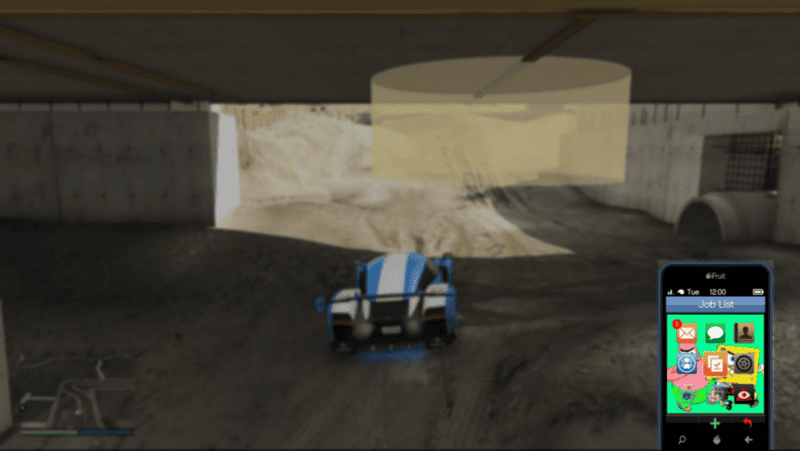
- Once the phone is open, select the middle icon that is an orange square with a checkmark inside it. This will bring up what mission you are currently on.
- To quit the mission, press the square button if you’re playing on a PlayStation. The X button on Xbox. Or if you’re playing on PC, press in the scroller wheel, or third, middle button on your mouse.
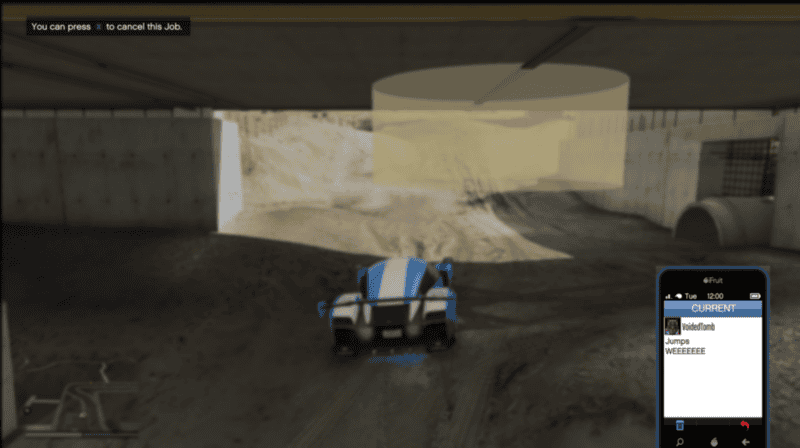
- It’ll ask if you’re sure so confirm that is what you want, and huzzah!
Going into a New Session:
This one is pretty self explanatory. In this method you’ll quit via finding a new session, which will cancel the mission you are currently on. This will cost you a bit of time and it’s the slower of the options.
- First, open the pause menu.
- Use the left or right bumpers to navigate to the Online tab.
- Scroll down the menu and select Find New Session.
From here you will be taken back to the loading menu to wait until a new session is found.
Quit the Game:
Lastly, more of a last ditch option, is to quit the game entirely. If you go to the home menu on your console, you can open the option menu to quit and close the game you currently have running in the background.
Reasons you could have for needing to quit a mission is none of our business. But don’t worry, we aren’t judging too hard if it’s just because it isn’t going well, pinky promise!







