Table of Contents[Hide][Show]
Terrain is a tricky thing in Donkey Kong Bananza — you’re meant to smash through all of it, but once it’s all gone, the skeleton of the level can be hard to navigate. When everything can be destroyed, you can actually lock DK off from gaining some bananas or traversing the layer at all — if you’re stuck, don’t worry, there’s always a way to restore terrain and reset a level to the start, pre-smashing and bashing. You’ll keep all the collectibles you’ve found so far, but the terrain in the layer will be reset and made pristine if you want to start smashing all over again.
There are two ways to reset the terrain — one happens automatically, and the other can be activated at any time from the map screen. The map actually shows an accurate representation of your current map, including how much it’s been destroyed, so if you need help finding bananas and your map doesn’t exactly match our’s, you can reset — learn how to get all the bananas in SL100, SL101, SL102 and SL200 to get started on your journey.
How To Reset Terrain At Any Time
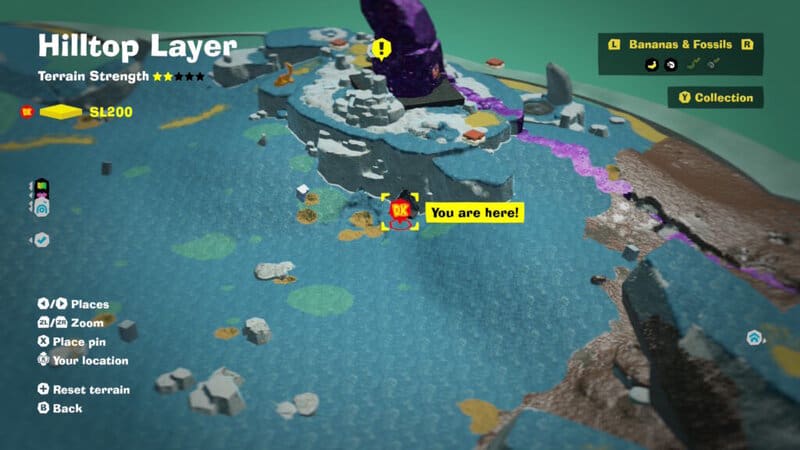
You can reset terrain at any time in-game if you’re stuck or just want a clean environment you can destroy all over again.
- Open the Map [-] to view the map screen.
- Press the [+] button again to reset terrain.
Doing so is simple — the game never explains how to do this, but if you’re paying attention to the menus, it’s possible to figure it out on your own. The function is prominently displayed on the Map screen at the bottom-left corner, but we don’t blame you for missing it. Some players that have way more game time than us in this game never noticed the option on the map screen, even after dozens of in-game hours.
When Does Terrain Reset Automatically?

Terrain in a layer will reset whenever you travel to another major layer — if you’re in Lagoon Layer and travel to Hilltop Layer, Lagoon Layer will reset when you return. Same for Hilltop Layer! Layers do not reset if you travel between sublayers, so if you’re going from SL101 to SL102, you won’t have to worry about your world resetting. It only resets between loading screens or using the major Teeleport stations at villages.
This happens as you progress the game, so if you don’t want maps to reset, don’t leave until you’ve found everything you can! Simply teleporting around the same layer also won’t reset the map, you have to leave the entire (major) layer — usually an entire set of levels — then come back, either by progressing the story or fast-travelling back.
It’s unlikely you’ll get all the bananas every single time, so you’re going to experience resets whether you want to see them or not. There are a lot of bananas on some layers, sometimes well over 100+ hidden bananas to find, so you’re better off pushing through the story and coming back later. You don’t actually need bananas to progress. It’s all for your own personal bananza.