Although it’s far from simple, the complexity of Xenoblade Chronicles 3‘s combat mechanics is much more easily digestible when breaking it down into smaller pieces. For newcomers, the game’s depth can be extremely overwhelming, but it’s much easier to learn when trying to understand individual pieces of its combat and then adding them all together when playing.
Master Arts are introduced midway through Chapter 2 alongside Fusion Arts and character class switching, so it’s only natural that some players may have missed the exact mechanics of Master Arts when being taught about three essential parts of the game at once. Luckily, they’re simple to understand when explained in-depth, so if you’re looking for a solid explanation, take a look at our guide below.
More Xenoblade Chronicles 3 guides:
| 6 Easy Combat Tips | How To Unlock All Characters & Classes | Collapsed Traderpon Quest Guide | How To Unlock All Traversal Abilities | Monster Types Explained | Tactics Guide | Chain Attack Guide | How to Attack Cancel | Heroes Explained | Ouroboros Form Explained | Fusion Arts Explained | What Do You Unlock With Amiibo? |
How to Use Master Arts
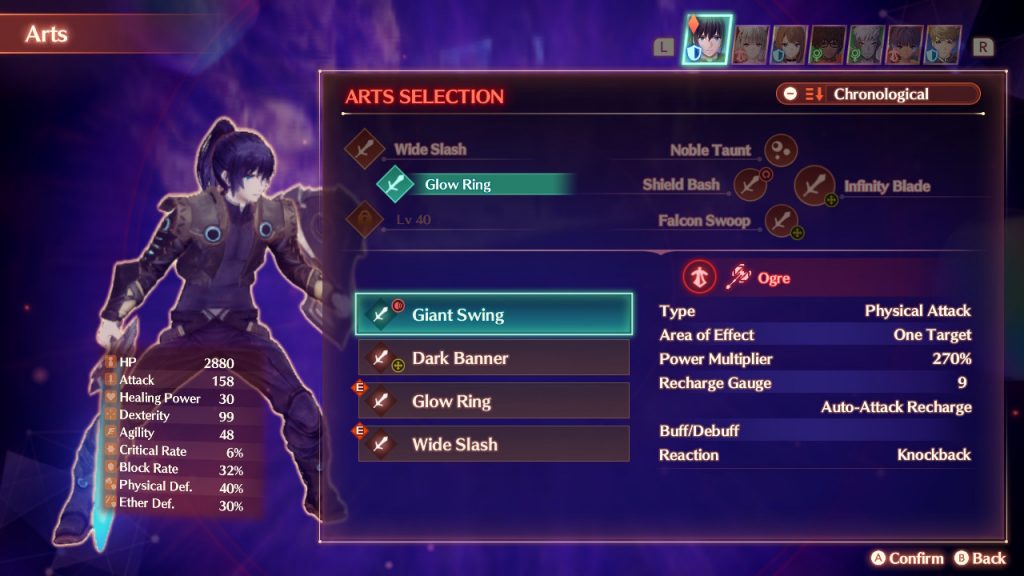
Master Arts are another Arts ability given to the player in Xenoblade Chronicles 3. As mentioned above, you’ll gain the ability to use them after your characters learn that they can switch classes in Chapter 2. After that point, Master Arts will be unlocked for the player to use at any time.
Master Arts are Arts that individual characters can learn when using a class that stay with them regardless of which class they are at any given time. For example, Noah is able to use the Class Art Wide Slash when playing as the Zephyr class. After leveling up the Zephyr class a little bit, he’ll have access to Wide Slash as a Master Art and be able to use it at any time regardless of whether he’s playing the Zephyr class.
While Class Arts change depending on which class a character is assigned, Master Arts stay the same across classes. To learn different Master Arts, the player needs to switch a character’s class to something they haven’t leveled up and use it until a new Master Art is learned.
Once equipped, Master Arts are mapped to the D-pad (up, right, and down.) When you first unlock the ability to use them, you’ll only have one slot available. To unlock more slots, you’ll need to reach levels 20 and 40. You can swap out Master Arts in the Arts section of the Characters menu in the same way that you’d swap Class Arts.
In addition to learning about Master Arts, you’ll be given tutorials about Fusion Arts. If you’re looking for an explanation of how to use Fusion Arts (a fusion between Master and Class Arts,) take a look at our guide right here.