• Skip to main content
  • Skip to header right navigation
  • Skip to site footer
Gameranx

Gameranx

Video Game News, Lists & Guides

  • News
  • Features
  • Platforms
    • Xbox Series X
    • PS5
    • Nintendo
  • Videos
  • Upcoming Games
  • Guides

iPhone: iOS 11 – Here’s How To Fix The ‘Black Dot of Death’ Chat Bug | Crash Guide

May 11, 2018 by Kevin Thielenhaus

Ported over from Android, the dreaded ‘Black Dot of Death’ is popping up on iOS 11 smartphones. Here’s how to fix it — whether you’ve got 3D Touch or not.

A new bug is locking up the Messages app completely on iOS 11 devices, and there are (currently) only two ways to fix your phone.

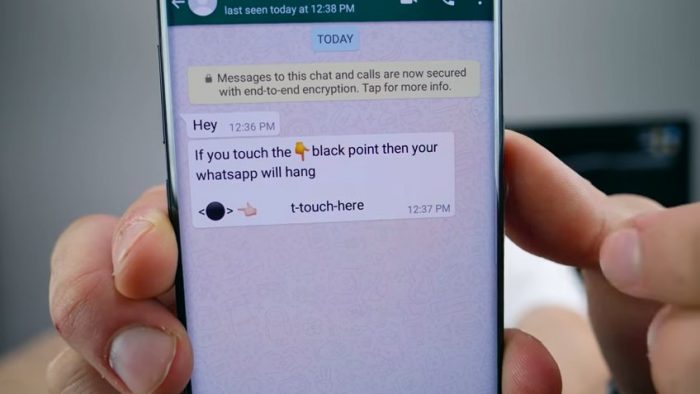
Called the ‘Black Dot of Death’, the bug is triggered by a text message with a large black dot. Turning off your phone and rebooting won’t fix it. The issue is with the message itself — that big weird dot? That’s actually an invisible string of Unicode text that will instantly lock-up your app if you happen to receive this message.

The ‘Black Dot’ bug effects iOS 11.3 and 11.4 — if you’re signed up for the Beta, this problem could effect you. There are a few ways you can fix it. Depending on your model, Apple recommends a different approach — and we’ll cover both methods below.



How To Fix The ‘Black Dot of Death’ Chat Bug | Crash Guide

If you’ve been affected by the ‘Black Dot of Death’ bug — which is a text message with a large black dot emoji that causes your Messenger app to crash — there are two ways to exit out of Messenger and remove the message.

  • iPhones with 3D Touch:
    1. Force close the Messenger app.
    2. Use 3D Touch from the Home Screen to select a new message.
    3. Cancel out of the new message, then go to the list of conversations on iMessage.
    4. Now you can safely delete the conversation with the ‘Black Dot’ bug.
  • iPhones without 3D Touch:
    1. Force close the Messenger app.
    2. Use Siri and reply to the sender of the ‘Black Dot’ message.
    3. Continue to reply until the ‘Black Dot’ message is pushed out of the visible part of the conversation on the screen.
    4. Now you can open iMessage (Messenger) and delete the conversation with the ‘Black Dot’ bug.

And that’s all it takes. Apple is looking for an official solution that should stop this message from working. Until then, here are two stopgap methods you can use to protect yourself.



Sources: [1], [2]

Share this post:

FacebookTwitterLinkedInPinterest

Recent Videos

Is This Already The WORST Game of 2026?

Is This Already The WORST Game of 2026?

ELDER SCROLLS 6 RELEASE DELAY EXPLAINED, NEW GAME LETS YOU BE GOD & MORE

ELDER SCROLLS 6 RELEASE DELAY EXPLAINED, NEW GAME LETS YOU BE GOD & MORE

Hytale - Before You Buy

Hytale - Before You Buy

10 Recent Good Games That Didn't Sell Well

10 Recent Good Games That Didn't Sell Well

10 NEW Fan Discoveries That'll Get You Playing Again

10 NEW Fan Discoveries That'll Get You Playing Again

Does UBISOFT Deserve A Comeback?

Does UBISOFT Deserve A Comeback?

Top 25 NEW Action RPGs of 2026

Top 25 NEW Action RPGs of 2026

10 Gaming Ideas They Thought Were Good...BUT NO

10 Gaming Ideas They Thought Were Good...BUT NO

10 DLCs That BROKE THE GAME

10 DLCs That BROKE THE GAME

Category: FeaturesTag: Android, Apple, Guides, iOS, iPhone, iPhone X

Sidebar

Recent Posts

  • Roblox: How to Remove Chat
  • Pokemon Go: How to Unlock and Level up Max Moves
  • Rumor: Resident Evil 30 Year Anniversary Event Teased By Sheva Alomar’s Actress
  • Rumor: CM Punk Will Be The Featured Superstar In WWE 2K26 Showcase Mode – Will He Be The Cover Star?
  • Hi-Fi Rush Receives New PEGI Rating For Nintendo Switch, Two Years After Original Rating Was Pulled

Copyright © 2026 · Gameranx · All Rights Reserved · Powered by Mai Theme