
In Valorant, customizing your profile can be costly. Most players want to show off the latest weapon skins and player cards in a match. Riot Games are now giving away a free Valorant player card named the Alpha Threat card and here is how you can get yours.
The Alpha Threat card is one of a few comic-book style cards in the game. Riot Games have been hinting at some kind of DC Universe narrative with an in-game cinematic and by incorporating a comic book store on the new map, Pearl. Apart from the fact that the card is completely free, the striking visuals of the card makes it a captivating addition to your profile.
More Valorant guides:
Valorant: How to View Your Purchase History | Valorant: Best Settings For Max FPS, Input Delay & Aiming | PC Tweaks Guide | Valorant: 10 Community Tips To Help You Become A Better Player | Beginner’s Guide |
How to get the Alpha Threat card in Valorant
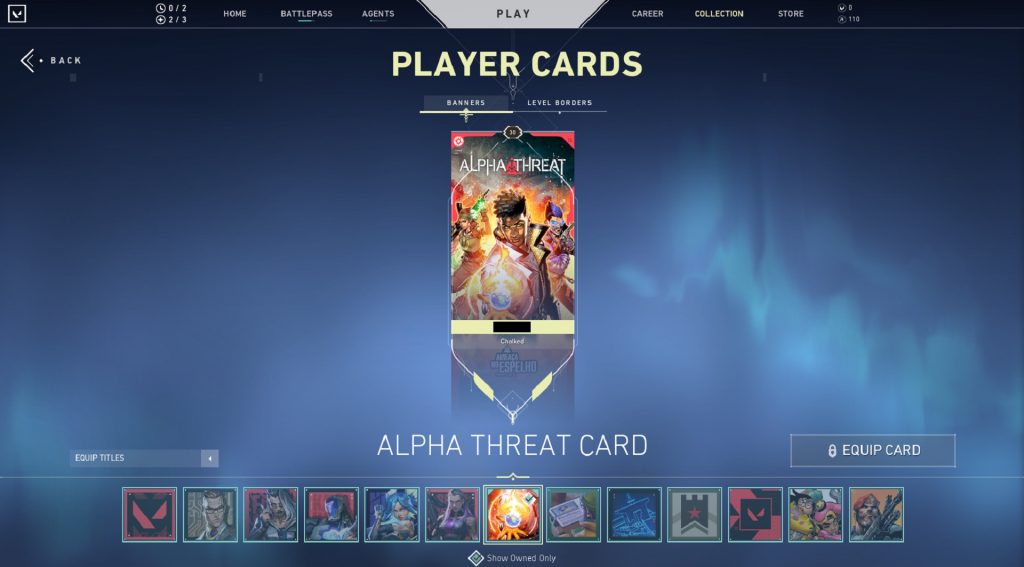
Getting your hands on the Alpha Threat card in Valorant is quite straightforward. All you have to do is make sure your Valorant client is updated to the 5.01 patch. Then, load up Valorant and the card will already be in your inventory, ready and waiting for you to equip it. Make your way to the ‘Collection’ part on the menu and you can find the Alpha Threat card under the ‘Player Cards’ section. Choosing the ‘Show Owned Only’ option should make the card easier to locate.
At the time of writing, it is unknown how long the Alpha Threat card will be available to claim in Valorant. Without confirmation from Riot Games we can’t be sure, but it can be assumed that the player card will only be available during the current act. It’s worth claiming it as soon as possible to avoid disappointment.








