
Table of Contents[Hide][Show]
Essence Transfer is one of the best services you’re not using in Diablo Immortal. Like lots of mechanics, Essence Transfer is poorly explained in-game and it isn’t clear exactly how to use it — a tutorial does pop-up for you to visit the Essence Transfer NPC if you collect more Legendary equipment than you can use, but that’s hardly enough to get the most out of this incredibly useful system. If you’re working toward Level 60 and need an extra boost to your abilities without spending money on microtransactions, the Essence Transfer is an easy solution. You’ll just need to take note of your favorite Legendary buffs.
You can download Diablo Immortal for free now on iOS and Android.
More Diablo Immortal guides:
5 Beginner Tips | Is It Really F2P? | All Classes List | Best PVE Classes | Ancient Nightmare Event Guide | How To Join Immortals | How To Play On PC | How Long To Beat | How To Unlock Crossplay | How To Earn Free Legendary Gear | Compatible Smart Phones List | How To Beat Blood Rose World Boss | Reaching Library of Zoltun Kulle | Level 35+ Farming | Level 60 Farming | How To Join Hidden Lair Dungeons | How To Claim The Horadric Set | 9 Lamps Puzzle Solution | Laser Mirror Puzzle Solution | How To Get +5 Rare Crests | How To Get Hilts & Hilt Trader Location | How Combat Rating Works | All Daily, Weekly & Monthly Activities | How To Craft Legendary Gems | How To Unlock Elite Quests
What Does Essence Transfer Do?
Essence Transfer is a service in Diablo Immortal that allows you to transfer a Legendary Skill Buff from one Legendary item onto another Legendary item. Every Legendary Item has a Skill attached to it — these buff one of your powers. Each Legendary item has one Skill attached to it. They’re not always useful.
Using Essence Transfer, you can copy your favorite Skill Buffs from one Legendary item onto another. Why would you want to do this? If you find a Legendary item with better stats but a lame Skill Buff, you can copy and paste the skill buff you want to keep from your old Legendary onto your new Legendary.
The system is really simple. You can start using it around Level 40+ — that’s when you’ll get 6+ Legendaries naturally while playing. If you’re using Legendary Crests, you’re guaranteed to get one Legendary drop per Elder Rift completion. By the endgame, you’ll get loads of Legendary items just by completely open-world events. Eventually, you’ll get lots of Legendary items with Skills you might want to hang onto.
How To Use Essence Transfer
To use Essence Transfer, travel to Rakkis Plaza in Westmarch. Look for the orange icon near the Rakkis Plaza Waypoint. Talk to the vendor Zamina to begin.
- Interact with Zamina to begin Essence Transfer.
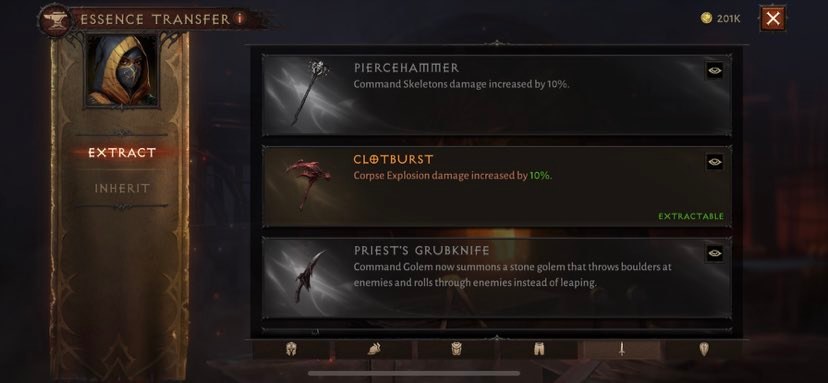
- Open the menu onto the [Extract] tab. On the right, there are different tabs for different types of Legendary items. Select the armor type / weapon / etc on the bottom row, then scroll to find the skill you want to extract.
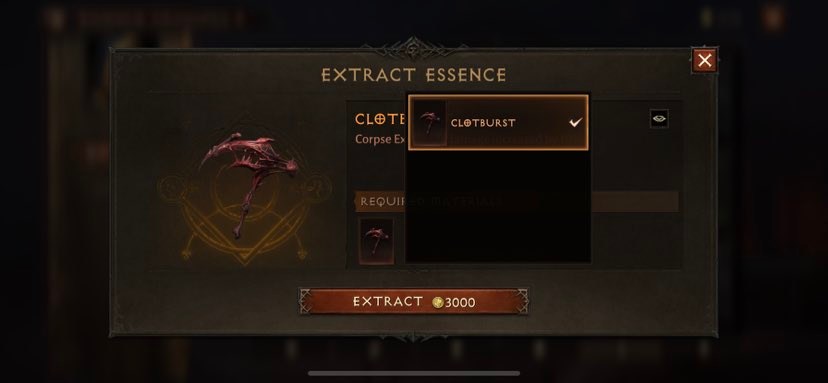
- Extraction will cost a set amount of gold. For this example, it cost us 3,000 gold.
Extracting a skill will DESTROY the Legendary item that’s been selected. Select the Legendary and place it into the material slot, then tap [Extract]. You’ll gain the skill in the Essence Transfer library.
- Once you’ve extracted a Legendary Skill, you can then transfer it onto a different Legendary item. Any will work. Open the Essence Transfer menu by interacting with Zamina, then select [Inherit].
- Select the Legendary item you want to transfer a Legendary Skill onto. You can select a currently equipped item or an item in your inventory with tabs at the bottom of the menu.
- Select the item, then [Inherit] -> then tap the slot to select from your available compatible Legendary Skills.
NOTE: Legendary Skills are only compatible with items of the same type. A Legendary Weapon Skill cannot be transferred onto a set of Legendary Armor.








