
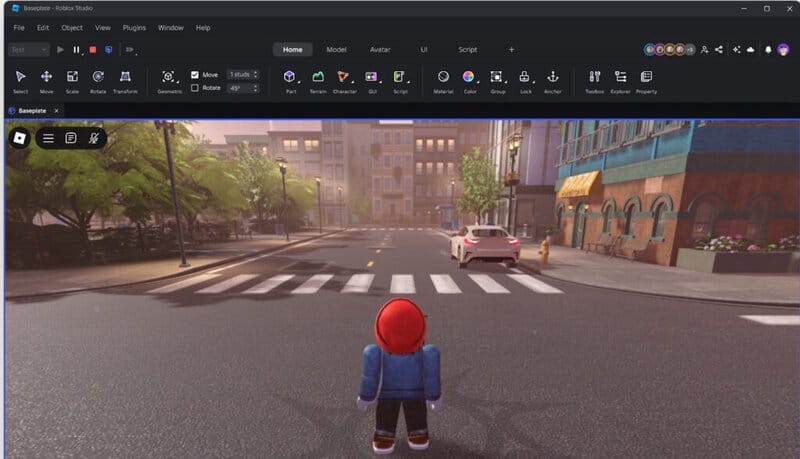
For Roblox, while the gaming element is what brings much of the 90+ million daily players to the table, it’s also true that there are many players who partake in the Creator Studio because they want to make various things for the universe. Some of them just do clothes, while others make full-on games and worlds for people to enjoy and explore. However, as any game developer will tell you, you need to have a good system of controls to make everything in the game click, and if you have things like a bad UI, no one will want to touch your building program.
While not bad by any stretch, especially given that so many Creator Studios exist in the universe, it is fair to say that there are improvements that can be made, and the Roblox team knows that. So, based on fan feedback, they’ve implemented some new changes to the UI via a beta run. In a new blog post, they revealed what these are like, including what you can do in the beta right now:
“Our initial release only allowed you to run a solo play test. Our design and engineering teams worked closely together to unify all the test and debug modes, including team test, into one convenient interface. In addition we fixed up numerous issues the old UI had with properly enabling/disabling button states, icons, etc. with our all new Contexts system. We also wanted these new controls to be in a persistent, easily accessible place in the main window and we decided to take the space that was formerly occupied by Quick Access.”
Another thing that the dev team revealed is that they’ll be focusing hard on making the UI fully customizable!
“Customization has always been at the heart of the Next Gen plan. You could add actions to the Quick Access area but there was no control of the ribbon tabs and toolbars. You now have full control over what tabs you see, what tools are on those tabs, and how they are displayed.”
That’s pretty cool, and it’ll allow dev teams to go full-tilt and design a system that flows well for them and helps them get things done quicker without struggling to find the right button or tab.
As for when the beta will be finished, the team notes it’ll likely be around June, and they’ll be taking more feedback during that time, so don’t be afraid to mention things you like or don’t like about the beta if you think it’ll mean making it better.






