
Table of Contents[Hide][Show]

Pikmin 4 is a sometimes-relaxing, sometimes-stressful adventure that tasks you with exploring a strangely familiar world with teeny-tiny carrot people. As a genre, Pikmin falls well within the RTS. This is rather unusual as that specific genre rarely works on consoles due to controller limitations.
Of course, none of this matters to Nintendo as they mastered the art 20+ years ago and Pikmin 4 is just a refinement of that core concept. To make controlling your hordes even easier, the game allows you to set four custom inputs – shortcuts to commands and even menus that you can change on the fly. This guide will walk you through how to do this whilst also giving you some tips on how to set up your four Shortcuts.
More Pikmin 4 content:
Beginners Guide | Every Pikmin Type | Oatchi Upgrades
How To Set Custom Shortcuts/Inputs In Pikmin 4
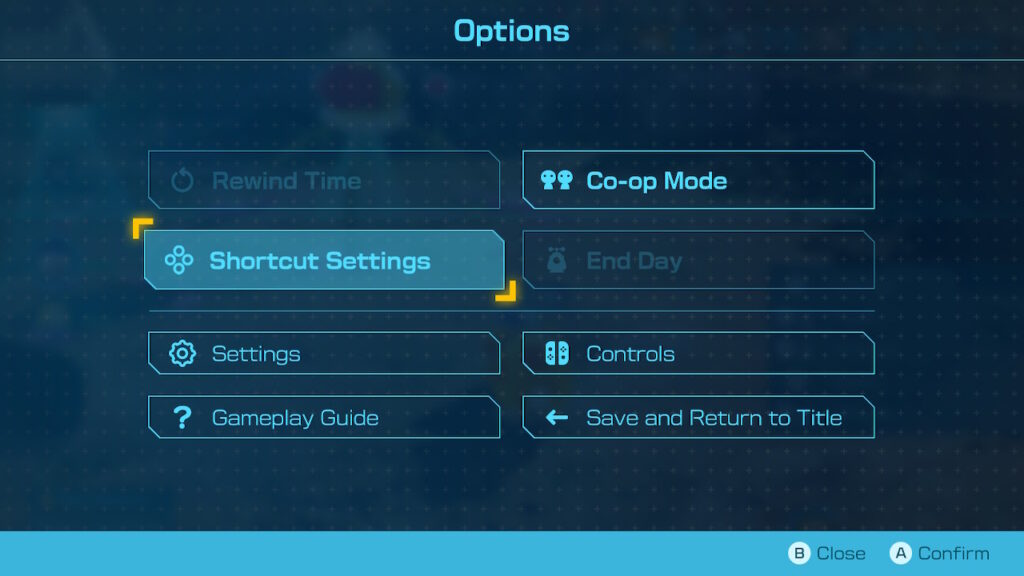
The game will inform you of this feature within the first few hours of play, however, you can discover this by yourself almost immediately if you go looking for it. To access the menu, you will need to press the ‘-’ button on your controller. This will bring up the Options menu.
From here, move your cursor down to the second option on your left. This should highlight ‘Shortcut Settings’. Press the ‘A’ button to select it. This will bring you to the Assign Shortcut Function screen.
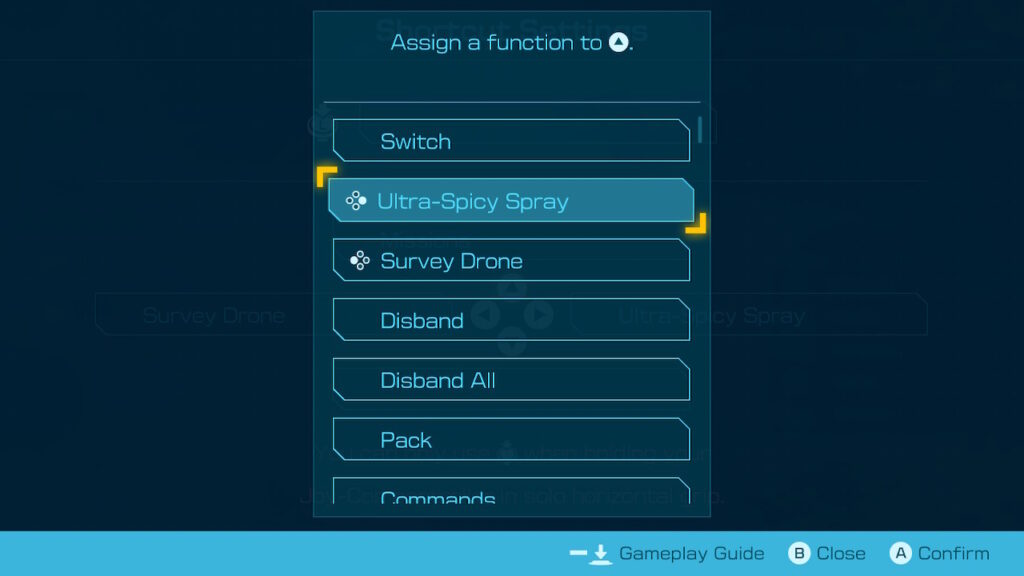
There are four available buttons to assign – all of which are mapped to your D-Pad. Simply press the ‘Up’, ‘Down’, ‘Left’, or ‘Right’ buttons to bring up a list of commands you can set. Find which one you want, press the ‘A’ button, and you are good to go. Repeat this for each direction and you’re done.
Best Shortcuts To Assign In Pikmin 4
You can assign just about anything to your D-Pad which gives you a staggering level of control-tweaking capability. It also adds a layer of uncertainty. With so many options, where do you even start? Well, we have some suggestions based on your play experience to help you get started.
Switch
Switch allows you to swap between your player-made avatar and Oatchi at a press of a button. This will allow you to better multi-task as you can effortlessly split your attention across multiple areas. The more you get used to Switching, the more effective you will be when playing.
Gather Pikmin
This is an unlockable ability, however, it is a very useful one. This command lets you send Oatchi away to look for stranded Pikmin. This usually means he will head back to the Onion and grab Pikmin who have finished transporting goods. He will then take those Pikmin and bring them back to you. Having this on a single button is essential to a smooth play experience in our opinion.
Disband
Sometimes you need to separate your Squad. Disbanding allows you to do this at a push of a button. You can then grab the specific Pikmin you need. It’s not as useful as some of the other options here, but it’s still used enough that assigning it will save a lot of time.
Ultra-Spicy Spray
Being able to apply a Squad-wide buff at the press of a button will drastically increase your effectiveness in combat. Assigning this early and using it often is the way to go. Just be sure to keep an eye on your inventory. You don’t want to run out after all.
That’s all we have on Pikmin 4 for now. Be sure to check out our other Guides and Lists for more Pikmin content.






