
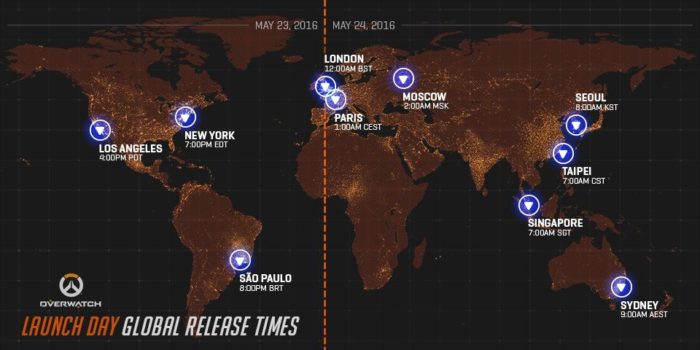
Overwatch is going to launch everywhere at the same time across the globe May 23rd/May 24th. The game can begin predownloading on Xbox One immediately, but PC users will be available to predownload no later than May 20th.
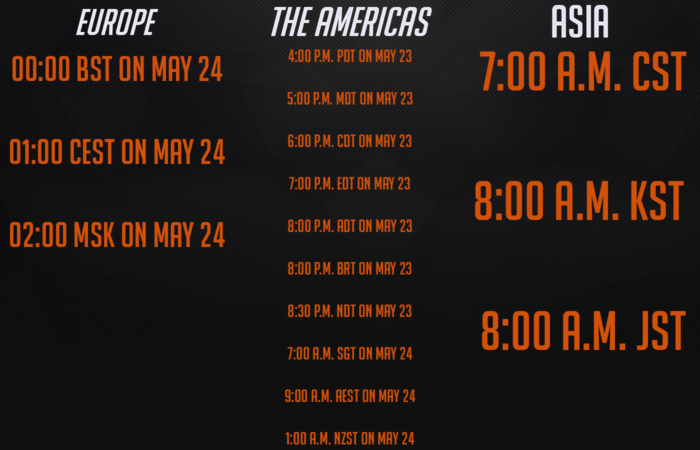
Just to make this painless, we’ll break down the process of getting your Overwatch game set-up so you’re ready to go. (Courtesy of the website page)
Windows PC
- Download and install Battle.net to your desktop. Launch it.
- Create a Battle.net account, or log-in with your existing account.
- Allow the Battle.net app to finish downloading any updates.
- Claim your game key in Account Management, if you purchased a physical copy.
- Click the Overwatch icon, located on the Battle.net app’s left side.
- Select your region. Are you from the Americas, Europe, or Asia?
- If you never played Overwatch before on PC, click install. If you have played Overwatch before, allow the game client to update.
- Click PLAY.
- Have fun.
PS4 (Physical)
- Turn on your PS4 (obviously). Log in to your local user account.
- Remove the Overwatch disc and insert in the console.
- Follow the on-screen instructions to begin installation.
- After installation, select the Overwatch icon and press X to begin.
- Have. Fun.
PS4 (Digital)
- Turn on the PS4, log in to your account.
- Auto Download enabled? Overwatch should start downloading automatically. But if you auto download is disabled, go to the Playstation Store and select Search from the menu.
- Type in Overwatch at the search field.
- Select Overwatch: Origins Edition from the search results, click “Download”.
- After installation, select the Overwatch icon and press X to begin.
- Obtain fun.
Xbox One (Physical)
- Turn on your Xbox One, log in to your Xbox Live account.
- Remove Overwatch disc from packaging, insert it into the console.
- Follow on-screen instructions, begin the installation process.
- After it installs, select the Overwatch icon and select “Launch” to begin.
- Acquire fun.
Xbox One (Digital)
- Turn on your Xbox One, log in to your Xbox Live account.
- Instant-On Mode enabled? Overwatch should download automatically. Instant-On Mode disabled? Go to the Xbox One Home screen, select “My games & apps.”
- Locate Overwatch in the “Games” tab, click “Install”.
- After it installs, select the Overwatch icon and select “Launch” to begin.
- Live long and prosper with fun.








