
Table of Contents[Hide][Show]
Minecraft is a great game to play, especially when you can invite a bunch of friends. If you have ever played a co-op game, then you likely know how much easier survival mode can become. This is due to the fact that making a base and mining goes much quicker when you have multiple players on your side. If you want to play on a bigger server, though, you will need to use a special Minecraft Realms service. The guide below will walk you through everything you need to know about setting up Minecraft Realms and how to use it properly.
More Minecraft guides:
Minecraft: How To Legally Play For Free | Minecraft: Where To Find Diamonds in 1.19? | The Wild Update | Minecraft Legends Announced For Nintendo Switch | Minecraft: How To Find The Ancient City | Deep Dark Biome Guide | What Does Minecraft Allay Do?
What is Minecraft Realms
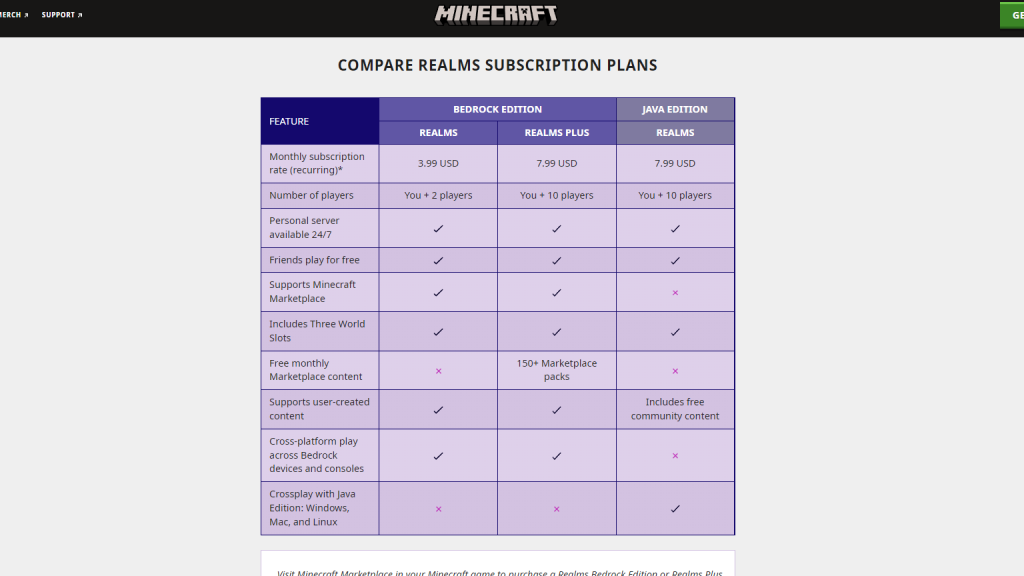
Minecraft Realms is an official way to create an always-online server for your game. The Realms service is connected to the game automatically, so everything is easy to set up and fluid. Furthermore, it uses a Cloud service, so it’s not linked to your PC or console like your normal Minecraft world. You do need to pay for this service, and there are two different tiers to pick from.
- Realms: $3.99 USD
- Realms Plus: $7.99 USD
- Realms Java: $7.99 USD
Realms Plus works with the Bedrock version of the game and allows ten players to join your server. This is how many popular servers where players work on massive projects have come to be made. While there are ways to make your own servers, Realms streamlines the process so that players who aren’t familiar with setup can easily make a large world that can be enjoyed by their friends.
If you aren’t sure how much use you will get out of the service, then you can try the 30-day free trial if you play on the Java version. Sadly, there isn’t a free trial of the Bedrock version, but you do have the choice to buy Realms Plus and gain access to content from the marketplace. Currently, this includes 150 plus packs for you to explore and use with your new server.
Keep in mind that basic Realms only allows you to have yourself and two other players on the server. Realms Plus will allow you and ten other players to be in the same server at the same time.
Making a Minecraft Realms Server
Setting up a Minecraft Realms server is simple. All you need to do is pay for the service and then load up your associated account. Once this is done, you will now have an option to create a Realms server. Simply click this, and your server will appear. This server is now available for you and your friends to hop in and out of without you having to keep your console or PC online to run it constantly.
Keep in mind that you must pay the monthly fee, or your server will go down.







