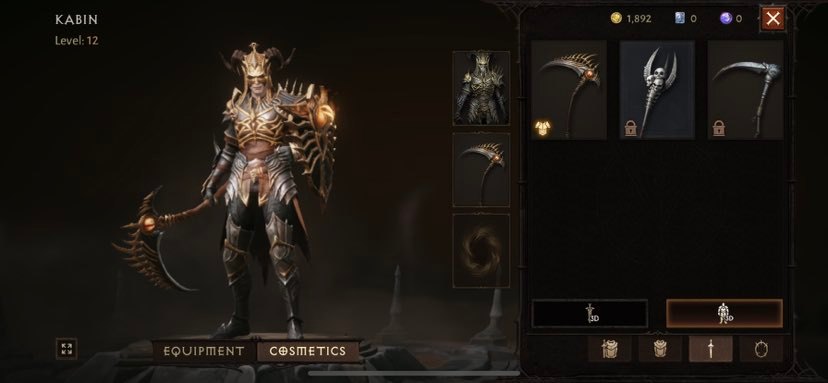
Every early player of Diablo Immortal has a unique cosmetic set waiting for them to claim. But a lot of players are struggling to get their hands on the Horadric Cosmetics — and for good reason, there’s multiple steps you have to take to claim and equip the cosmetics. Not only do you have to complete a specific mission, but you also need to access a menu, access a separate menu, and access yet another menu all while downloading an additional content pack to actually access the cosmetic you want.
Diablo Immortal is a fun little game that’s also a total mess of menus you’ll need to explore fully to figure out — but don’t worry, you can claim this set at any time after finishing the tutorial. If you want to start wearing it right away, follow the step-by-step process below.
You can download Diablo Immortal for free now on iOS and Android.
More Diablo Immortal guides:
5 Beginner Tips | All Classes List | How To Join Immortals | How To Play On PC | How Long To Beat | How To Unlock Crossplay | How To Earn Free Legendary Gear | Compatible Smart Phones List
Collecting The Horadric Set | New Account Cosmetic Reward
The Horadric Set is a unique one-time reward after starting your account in Diablo Immortal. You can only claim this set on ONE CHARACTER — and you can’t claim it again if you’ve accepted it. Finding the Horadric Set is surprisingly confusing, so here’s how it works.
- Complete the first mission. You’ll know you’ve completed the tutorial if other characters are everywhere in town. You’ll know you’ve completed the tutorial if you’re sent to Ashwold Cemetery.
- Open the menu and select Events on the left. Select Horadric Cosmetic to accept your reward.
- To actually equip it, exit the Events menu and then tap the Letter symbol in the upper-right. This opens your mail menu. Select “Pre-Registration Reward: Free Horadric Legacy Cosmetic” -> then tap Collect.
- Finally, go to the Inventory menu — under your character, select Cosmetics. From this menu you can equip the cosmetic and change your look.
This isn’t an armor set — it is a purely cosmetic costume you can wear over your regular armor to give yourself a cool legacy look. You won’t be able to equip the cosmetic until you’ve downloaded the additional cosmetics pack. This is a free DLC expansion that will begin downloading after you agree to the terms after selecting cosmetics.