

Horizon Forbidden West features an incredibly immersive open-world: one of the best-looking maps ever put into a game. Based on the sheer amount of detail that’s on display, it’s clear that Guerilla Games put a lot of thought into each area and its design. Forbidden West is a video game, however, and being able to see which items to grab and what Aloy can interact with is crucial and can go against some of the visual design elements on display.
As a result of the conflict, Guerilla opted to keep the natural-looking beauty of Forbidden West intact, unhindered by UI elements but also gives the player the ability to scan a radius surrounding Aloy to highlight which parts of the environment are all for show and which can be crafted into life-saving arrows.
That system works alright for some but can get pesky for others as scanning is mapped to clicking the right stick and needs to be done constantly if the player wants to be picking up enough resources to craft their way through the next encounter. Luckily, the option exists to permanently highlight all interactable items within Horizon Forbidden West‘s deep customization menus.
More Horizon Forbidden West guides:
Explorer and Guided Mode Explained | Horizon Forbidden West Difficulty Trophies | ‘Reached the Daunt’ Trophy Guide | How to Get God of War Face Paint | Best Skills to Get First | Relic Ruins Locations and Puzzle Solutions | How to Upgrade the Resource Pouch | All Tallneck Locations | All Signal Lens Locations | How to Get the Flying Mount | All Machine Locations | Legendary Weapons Locations
How to See Items Without the Focus
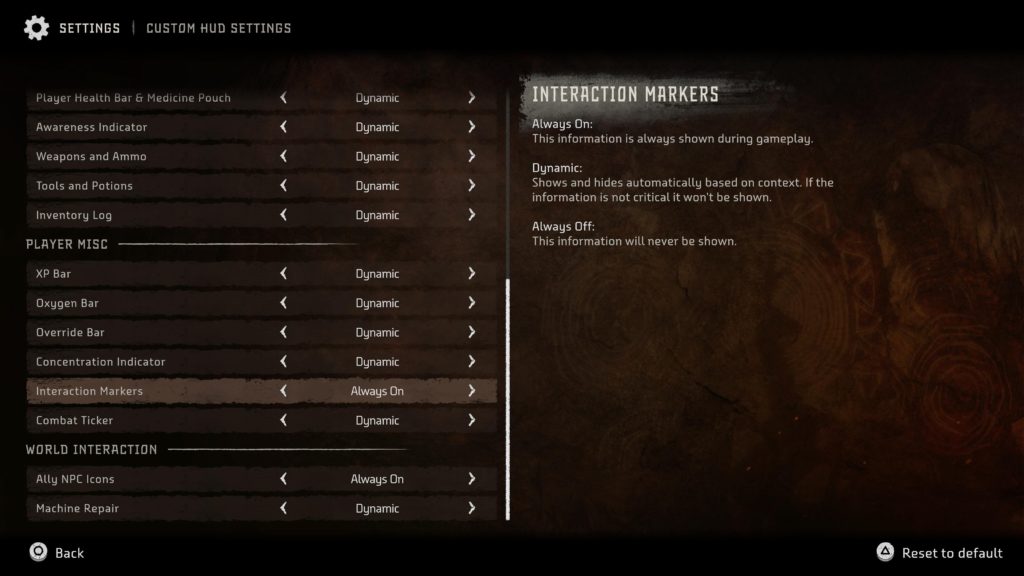
Switching things to better indicate which items Aloy can interact with is pretty straightforward. Simply open the pause menu by hitting the “Options” button on PS4 DualShock controllers and the button with three horizontal lines on the PS5 DualSense. Scroll down to settings, select it, and stay on the “General” tab at the top of the screen.
In the second group of settings from the top, players should see the option “HUD Visibility” which is likely turned to “Dynamic.” There are three options that the player can choose from: Dynamic (which generally turns UI elements off except when contextually relevant,) Always On (which is pretty self-explanatory,) and Custom which allows the player to go in and change each UI element to their liking.
If the player is satisfied with how Horizon Forbidden West handles HUD visibility apart from not highlighting interactable items, it might be better to set the option to custom and change the “Interaction Markers” setting to “Always On” instead of having to deal with all HUD elements be visible at all times.


